An AI knowledge base your whole team's AI tools can read is one shared set of plain files (your clients, products, decisions and how-tos) that Claude, ChatGPT, Cursor, Claude Code and Codex all reach through the same connector. Most teams get there with an MCP connector for the chat apps and a short instructions file in each code folder. You keep one copy, set who can read each part, and nobody pastes the same pricing sheet and client notes into four different tools.
Key takeaways
- Each AI tool keeps its own memory, so knowledge saved in one never reaches the others.
- MCP is the common route in: Claude, ChatGPT and Cursor can all connect to one source.
- Start with the five documents people re-explain most, and give each one an owner.
Our example is a 30-person company. Sales lives in ChatGPT, ops and finance use Claude, and the engineers split between Cursor and Claude Code. Each group has rebuilt the same pricing notes and client background inside its own tool.
Why can't each AI tool just use its own memory?
Each AI tool stores what it knows in its own place, so a fact saved in one is invisible to the rest. A Claude project, a ChatGPT project and a Cursor rules file can each hold your pricing sheet, and all three go out of date separately.
Most companies now run more than one model, which makes this the normal case. Menlo Ventures' mid-2025 survey of 150 technical decision-makers put enterprise LLM usage at 32% Anthropic, 25% OpenAI and 20% Google [1].
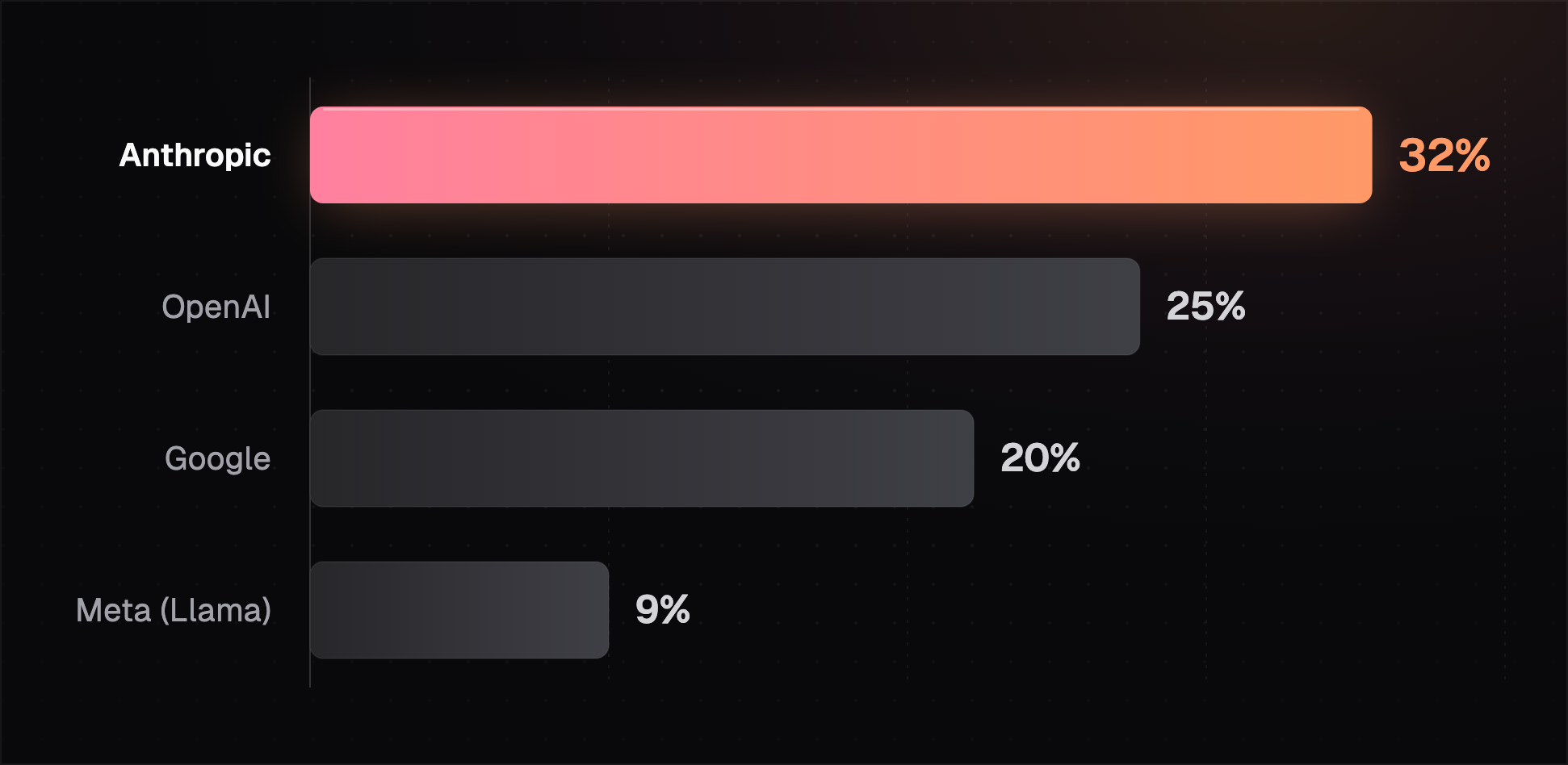
When usage is split like that, a knowledge base tied to one vendor only reaches part of the team. The fix is a source that sits outside every tool and that each tool can read.
How do Claude, ChatGPT and Cursor read the same knowledge base?
Claude, ChatGPT and Cursor can all read the same knowledge base through the Model Context Protocol (MCP), an open standard for connecting AI tools to outside data. You run or rent one MCP server in front of your files, and each tool connects to it.
MCP is now run by the Agentic AI Foundation at the Linux Foundation, which counted more than 10,000 published MCP servers when it formed on December 9, 2025 [2]. The same foundation took on AGENTS.md, the instructions file that coding agents read, which more than 60,000 open-source projects use [3].
10,000+
Published MCP servers when the protocol moved to the Linux Foundation.Source: Linux Foundation, December 9, 2025
Each tool connects a little differently. Here's how each one in our example gets to the shared files.
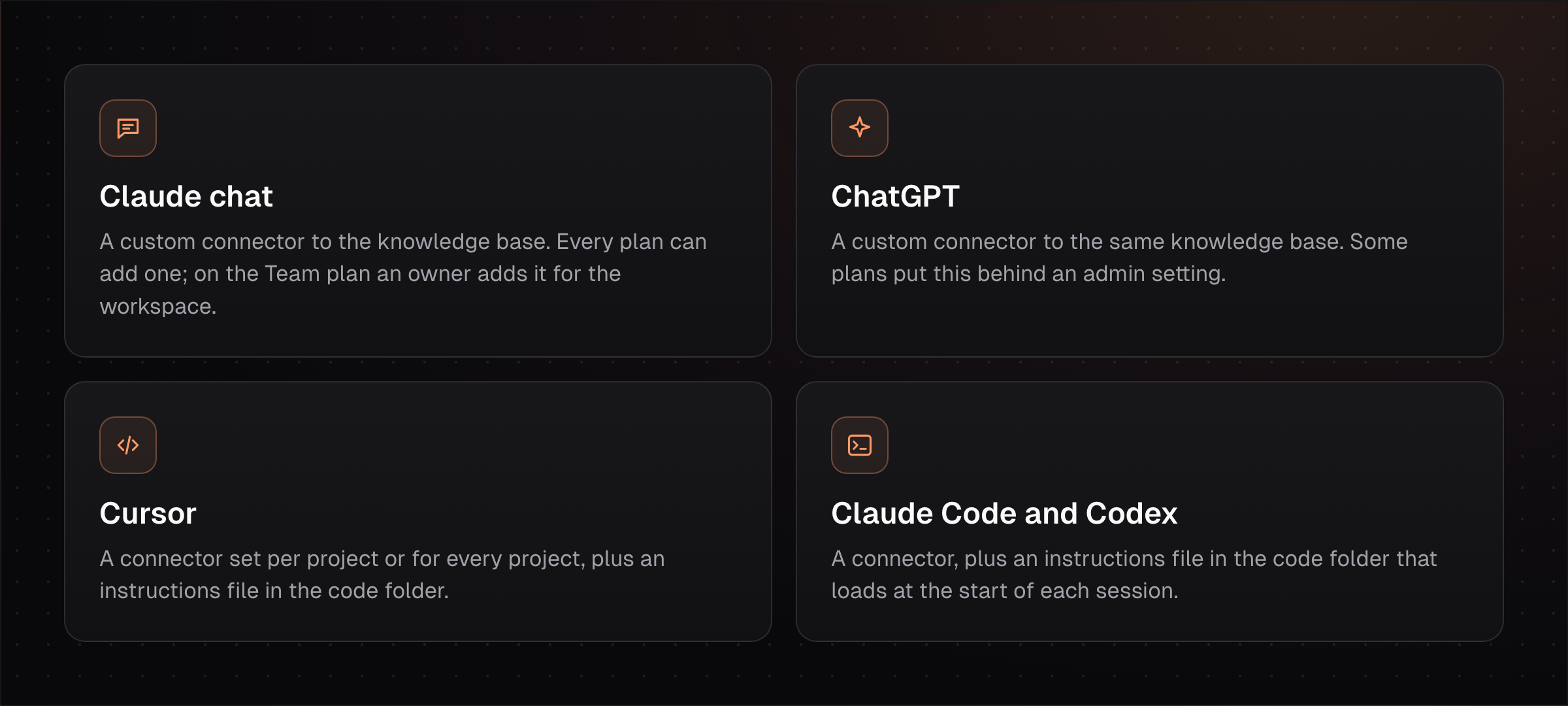
Claude supports custom MCP connectors on the Free, Pro, Max, Ultra, Team and Enterprise plans, with Free users limited to one, and on Claude Team only owners and primary owners can add them [4]. Cursor reads MCP servers from a settings file in the project or in your home folder [5], and it also reads AGENTS.md [3]. With every tool pointed at one source, the next question is what goes in it.
What should go in a team AI knowledge base first?
A team AI knowledge base should start with the few documents people paste into AI chats every week. In our example that's the pricing sheet, a one-page brief per client, the brand voice guide, the product FAQ and the list of decisions made this quarter.
Write each one as plain text with a date and an owner at the top. AI tools read short, current files better than long wikis, and an owner means someone fixes the page when a price or client changes.
Quick check: ask three teammates what they pasted into an AI tool this week. Anything two of them pasted belongs in the knowledge base.
Keep secrets and personal data out of these files. Passwords and API keys belong in a vault, and HR records belong behind tighter access, which brings up who can read what.
How do you control which AI tool sees what?
Access to a shared AI knowledge base should follow the person, so each teammate's AI tool sees only the folders that teammate is allowed to see. A sales rep's ChatGPT can read the pricing sheet and client briefs, and finance's Claude can also read the margin model.
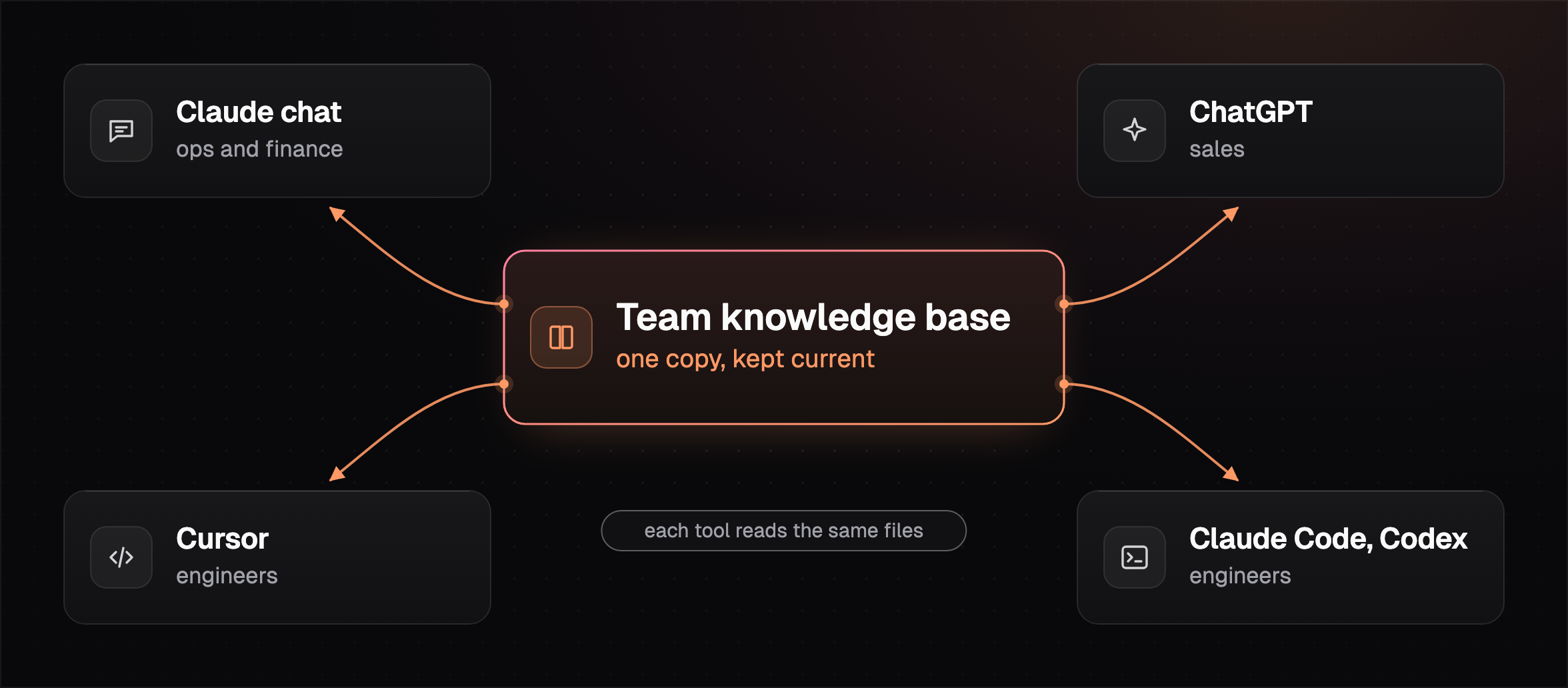
Each person's AI should read what that person can read, and nothing more.
That's easiest when people sign in to the connector as themselves, so permissions come from one place instead of being copied into every tool. For more on what belongs in a shared source and how it stays current, see what a company brain is.
How this works in HQ
HQ is a shared home for your business context that every AI tool on the team can read.
- Sales in ChatGPT and engineers in Claude Code read the same files.
- Each person only sees the files they have access to.
- What one person's AI learns can be saved for the next person.
See how teams build a shared company brain, or read how to give Claude, Claude Code and Codex the same memory.
FAQ
What's the best tool to share AI knowledge and skills across Claude, ChatGPT and Cursor?
The best tool for sharing AI knowledge across Claude, ChatGPT and Cursor serves one knowledge base over MCP, since all three can connect to an MCP source, and it should let you set access per person and keep files current.
Can I use Notion or Google Drive as an AI knowledge base?
Notion or Google Drive can work as an AI knowledge base if every tool your team uses can connect to it and respects each person's sharing settings. Check the connector for each AI tool, since coverage differs by tool and by plan.
Is AGENTS.md enough for a team knowledge base?
AGENTS.md covers coding agents working in one code folder, and it's read by tools like Codex and Cursor [3]. Chat apps like Claude and ChatGPT don't read it, so non-engineers need a connector to the same source.
How big should an AI knowledge base be at the start?
An AI knowledge base can start with five to ten short documents people already re-explain every week, and grow once those are kept current.
Sources (5)
- 2025 Mid-Year LLM Market Update, Menlo Ventures, July 31, 2025, checked November 16, 2026.
- Linux Foundation announces the Agentic AI Foundation, December 9, 2025, checked November 16, 2026.
- AGENTS.md, checked November 16, 2026.
- Get started with custom connectors using remote MCP, Claude Help Center, checked November 16, 2026.
- Model Context Protocol, Cursor docs, checked November 16, 2026.
Last updated November 16, 2026. Facts checked November 16, 2026.