For agencies and MSPs running AI agents across many clients: one agent identity, scoped keys, and one workspace per client, plus a leak test.
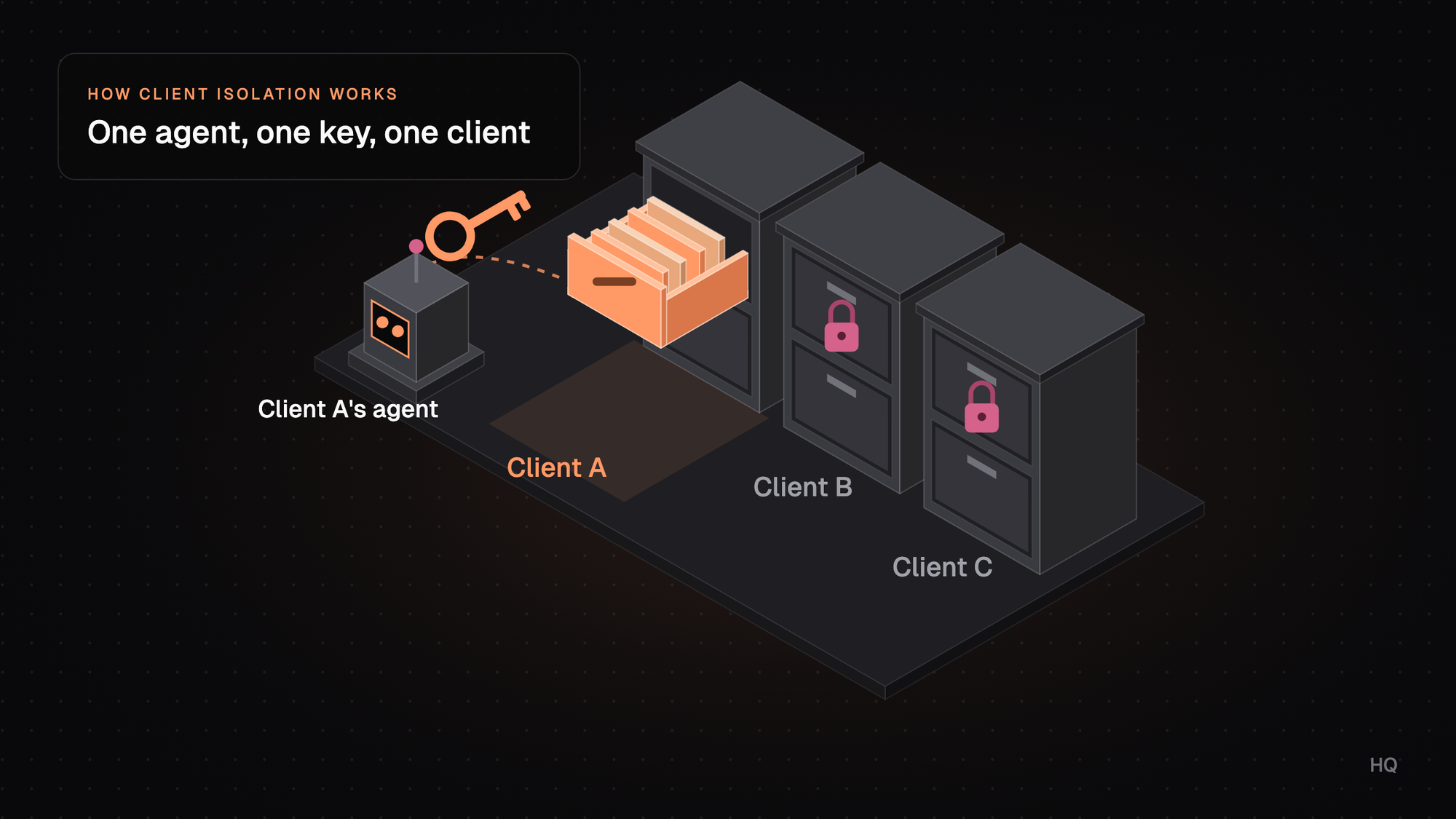
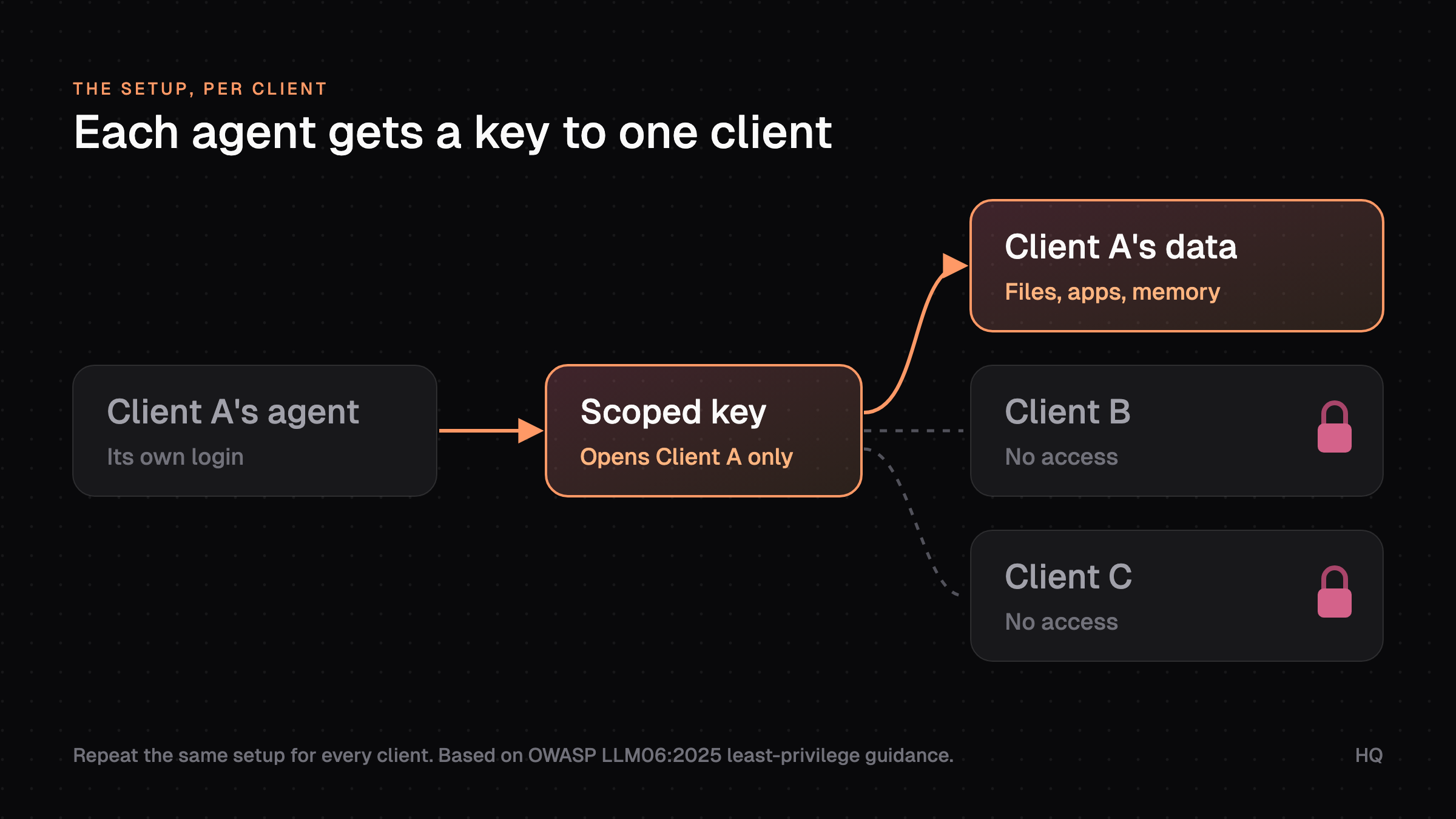
To give an AI agent access to one client's data only, give that client its own agent identity, its own credentials scoped to that client's accounts, and its own workspace for files and memory. Then test it: ask the agent for another client's data and confirm it can't get it. Repeat that for every client.
Key takeaways
- Most multi-client leaks start with shared logins, shared keys, and shared chat history.
- Start each agent read-only and add write access one action at a time.
- Put a named person in front of sends, spend, and deletes, and log every action.
Is it safe to give an AI agent access to client data?
Yes, if the agent can only reach the one client it's working for and you can prove that. The main risk is one key that opens more than one client's accounts.
With a key like that, a bad prompt or a confused instruction can pull the wrong data into the wrong place. So can a document copied in from someone else's account.
What does the research say?
OWASP's 2025 Top 10 for LLM applications lists "Excessive Agency" as LLM06. It names three root causes: excessive functionality, excessive permissions, and excessive autonomy. (OWASP, LLM06:2025)
That boils down to three questions you can ask about any agent:
- Does it have tools it doesn't need?
- Do those tools have more permission than the job needs?
- Can it take a high-impact action without someone signing off?
If any answer is yes, you've got excessive agency, whatever model you're using. Sensitive Information Disclosure is LLM02 on the same list, and its first fix is least privilege. (OWASP, LLM02:2025)
How often do agents go out of bounds?
Often enough to plan for it. In a 2025 SailPoint survey of 353 IT professionals, 80% said their AI agents had already done something outside their intended scope. (SailPoint, CFO Dive)
39%
of IT professionals said AI agents reached systems they weren't meant to.Source: SailPoint, 2025
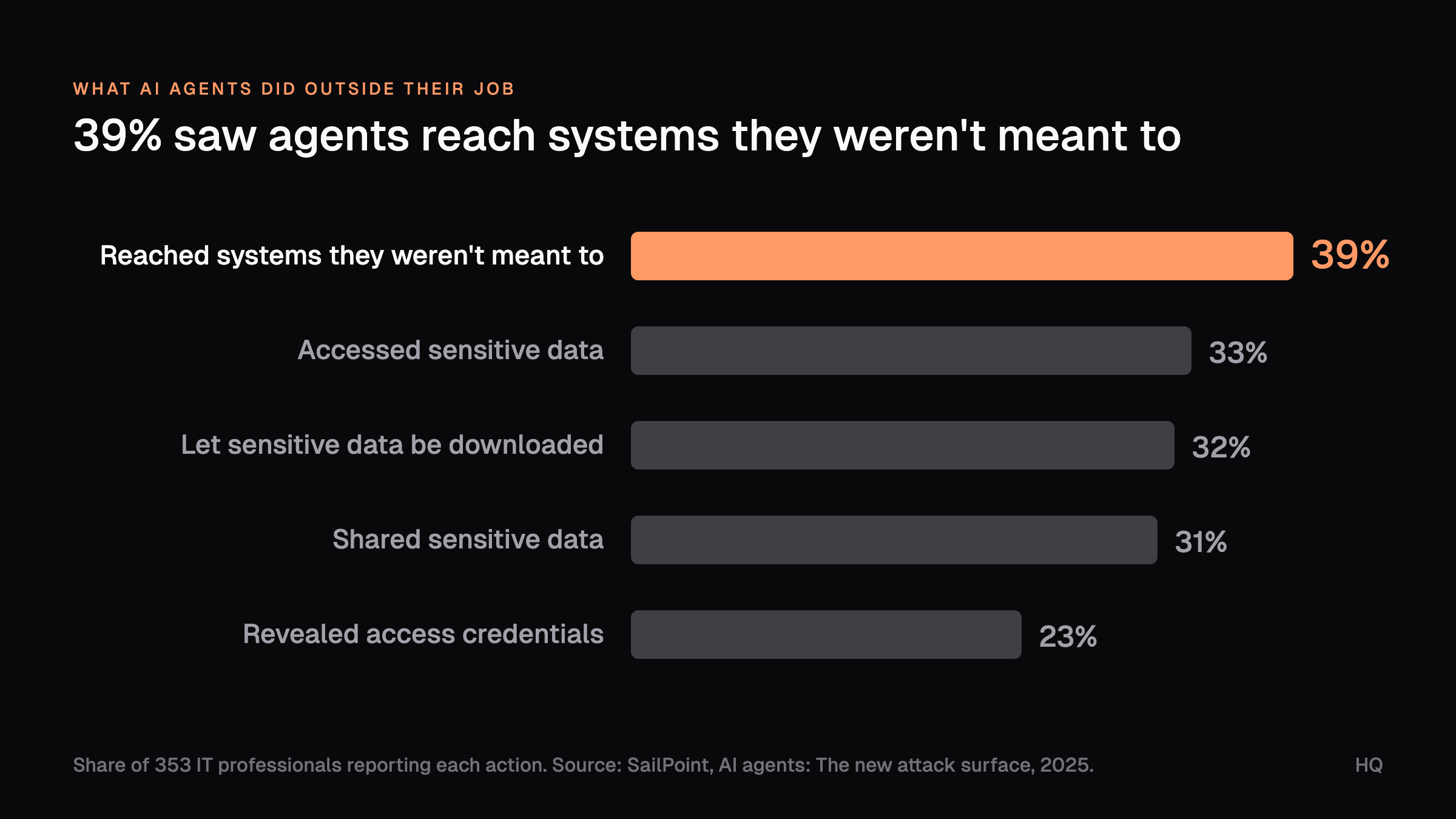
Those numbers come from companies of every kind. For a firm with many clients, the next question is how access is set up today.
How are agencies and MSPs handling AI agent access today?
Mostly by hand, and unevenly. The common pattern is a few power users who've connected their own accounts to an AI tool, with whatever access their login has.
That usually means the agent can see every client the person can see. Some firms add folder rules or separate chat projects per client. That helps with files, but credentials and connected apps stay shared.
Where do multi-client leaks start?
In the things everyone shares:
- A single Google Workspace login that sees every client's Drive.
- One admin API key for a tool that holds all your tenants.
- A shared chat project where last week's client notes are still in context.
The firms that get this right treat each client like a new tenant: separate identity, separate keys, separate storage, and a log. Here's how to set that up.
How do you scope an AI agent to one client?
Set it up for one client, test it, then repeat it from the same checklist. Here's what we'd do for a firm with about ten active clients.
Steps 1 to 4: identity and keys
- List what the agent needs for this client. Write down the job (weekly ad report, ticket triage, content drafts) and the exact systems: which ad account, which Drive folder, which help desk queue. Anything not on the list stays off.
- Create a separate workspace for the client. Client A's files, notes, memory, and chat history live only there. Don't reuse a shared folder with subfolders per client.
- Give the agent its own identity per client. Create a service account or bot user for "Client A agent." If it runs under a person's login, it sees everything that person sees.
- Issue credentials scoped to that client only. Use OAuth with the narrowest scopes, or API keys tied to that client's account. A GitHub fine-grained token can be limited to one org, chosen repos, set permissions, and an expiry date. (GitHub Docs)
OWASP's fix for excessive permissions is the same idea: user-scoped OAuth with "the minimum scope required," instead of one high-privilege identity. NIST defines least privilege as the minimum access a user, or a process acting for one, needs for the task. (NIST)
If the agent runs on a person's login, it sees every client that person sees.
Steps 5 to 7: tools and connectors
- Start read-only. Add write access one action at a time, only when the job needs it. MCP's security guide warns against wildcard scopes like
*orfull-accessand recommends starting minimal. (MCP security best practices) - Keep keys out of prompts and shared files. Store each client's keys in a secrets manager tied to that client's workspace. A key pasted into a chat can be reused by anyone who reads it.
- Check every connected tool and MCP server. Confirm which account each one signs in as. The MCP authorization spec says servers must only accept tokens issued for themselves and must not pass tokens through. (MCP spec, 2025-06-18)
An MCP server that proxies one admin token for all your clients undoes every other step. Once the connectors are clean, the last three steps cover people and proof.
Steps 8 to 10: approvals, logs, and the test
- Put a person on high-impact actions. Sending client email, changing budgets, closing tickets, and deleting anything wait for a named approver. That covers OWASP's "excessive autonomy" cause.
- Turn on logging. Log which agent acted, for which client, with which credential, and what it touched. OWASP notes logging limits the damage and tells you what happened.
- Test the boundary, then copy it. From Client A's agent, ask for Client B's report, open Client B's folder, and call Client B's API. Every attempt should fail.
Quick check: open a fresh session with one client's agent and ask, "What do you know about [another client]?" If it answers with anything, that client's data is leaking.
Most of the setup time goes into steps 1 and 4. After the first client, the checklist below makes the rest faster.
What should you scope, and how do you check it?
Scope eight things per client, and test each one in a few minutes. Every row has a test that should fail from the wrong client.
What to scope
Files and notes
How to scope it
One workspace or folder per client
How to check it
Ask the agent for another client's file by name. It shouldn't find it.
Memory and chat history
How to scope it
Separate workspaces, no cross-client memory
How to check it
Ask a new session about another client. It should know nothing.
Agent identity
How to scope it
A service account or bot user per client
How to check it
Check each tool's user list. The account belongs to one client.
API keys and OAuth tokens
How to scope it
Narrowest scopes, one client's account, expiry dates
How to check it
Call another client's account. It should return an access error.
Connected tools and MCP servers
How to scope it
Each connector signs in with that client's credential
How to check it
Review each connector's account. Remove shared admin logins.
Write and send actions
How to scope it
Read-only by default, approval for sends, spend, deletes
How to check it
Ask for a test email. It should wait for approval.
Audit log
How to scope it
Agent, client, credential, action, time
How to check it
Pull last week's log. Every action maps to the right client.
Offboarding
How to scope it
Revoke keys and agent access when the contract ends
How to check it
Rerun the boundary test. Every call should fail.
Rerun the boundary test whenever you add a tool. Next, here's how this maps onto HQ.
How does this work in HQ?
We built HQ around this pattern. Each client gets its own company in HQ with its own knowledge, people, bots, projects, credentials, and history.
An agent working in Client A's company only sees Client A's context. Your firm's methods, like a reporting skill or a QA checklist, can be shared across clients on purpose without moving any client's data.
If you run an agency, the HQ Agency Kit gives you a starting setup for this. It onboards each new client with a sourced brief, an intake request, an audit, and a kickoff package, and a strategist approves each one before it reaches the client.
- Access is granted to people, groups, and bots per company.
- Secrets are injected at run time instead of pasted into prompts. See how to share AI tools securely.
- Sensitive actions can require a reviewer.
The first test we suggest is step 10: grant one bot one client's knowledge and one capability. Then confirm an authorized user can finish the job and an unauthorized one can't.
See Run isolated client and brand workspaces and Govern AI access, knowledge, and approvals for the setup. The questions below cover what clients and teams ask most.
FAQ
Can one AI agent safely serve all of my clients?
One agent design can, run as a separate instance per client with its own identity, keys, and workspace. A single agent holding every client's credentials is the setup OWASP's least-privilege guidance warns against.
What's the difference between scoped API keys and OAuth scopes?
A scoped API key is a static key limited to certain resources, like a GitHub fine-grained token for one org. OAuth scopes are granted at sign-in, tied to a user or service account, and can expire or be revoked. Either works if it's limited to one client.
Do MCP servers handle client isolation for me?
No. The spec requires servers to accept only their own tokens and forbids passing tokens through. Which client's data a server can reach still depends on the credential you connect it with.
How do I prove to a client that their data stays separate?
Run the boundary test from step 10 and keep the result, with the audit log tying every agent action to their account. A short written summary plus that result gives them something concrete to review.
What should I log for AI agent access?
Log the agent, the client, the credential, the action, the data touched, and the time. That answers "what did the agent do in my account last week?" if a client asks.
Sources (9)
- OWASP, LLM06:2025 Excessive Agency
- OWASP, LLM02:2025 Sensitive Information Disclosure
- OWASP Top 10 for LLM Applications 2025
- NIST CSRC glossary, least privilege (SP 800-12 Rev. 1)
- Model Context Protocol, authorization spec (2025-06-18)
- Model Context Protocol, security best practices
- GitHub Docs, managing personal access tokens
- SailPoint, AI agents: The new attack surface (2025 press release)
- CFO Dive, June 2, 2025, on the SailPoint survey of 353 IT professionals
Last updated October 23, 2026. Facts checked October 23, 2026.