For agencies of 10 to 50 people running client work through Claude: one walled-off space per client, keys that stay put, and a checklist.
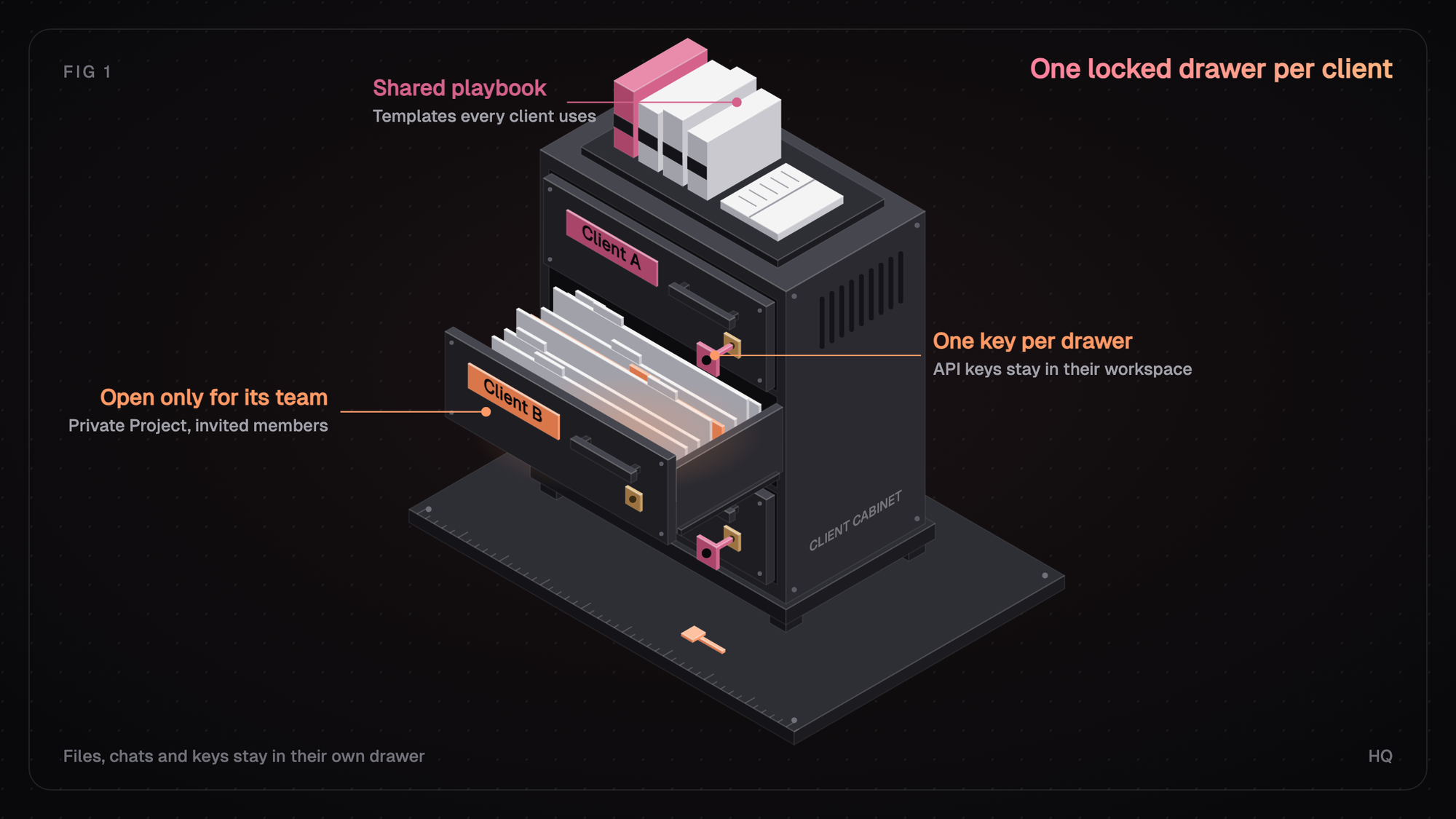
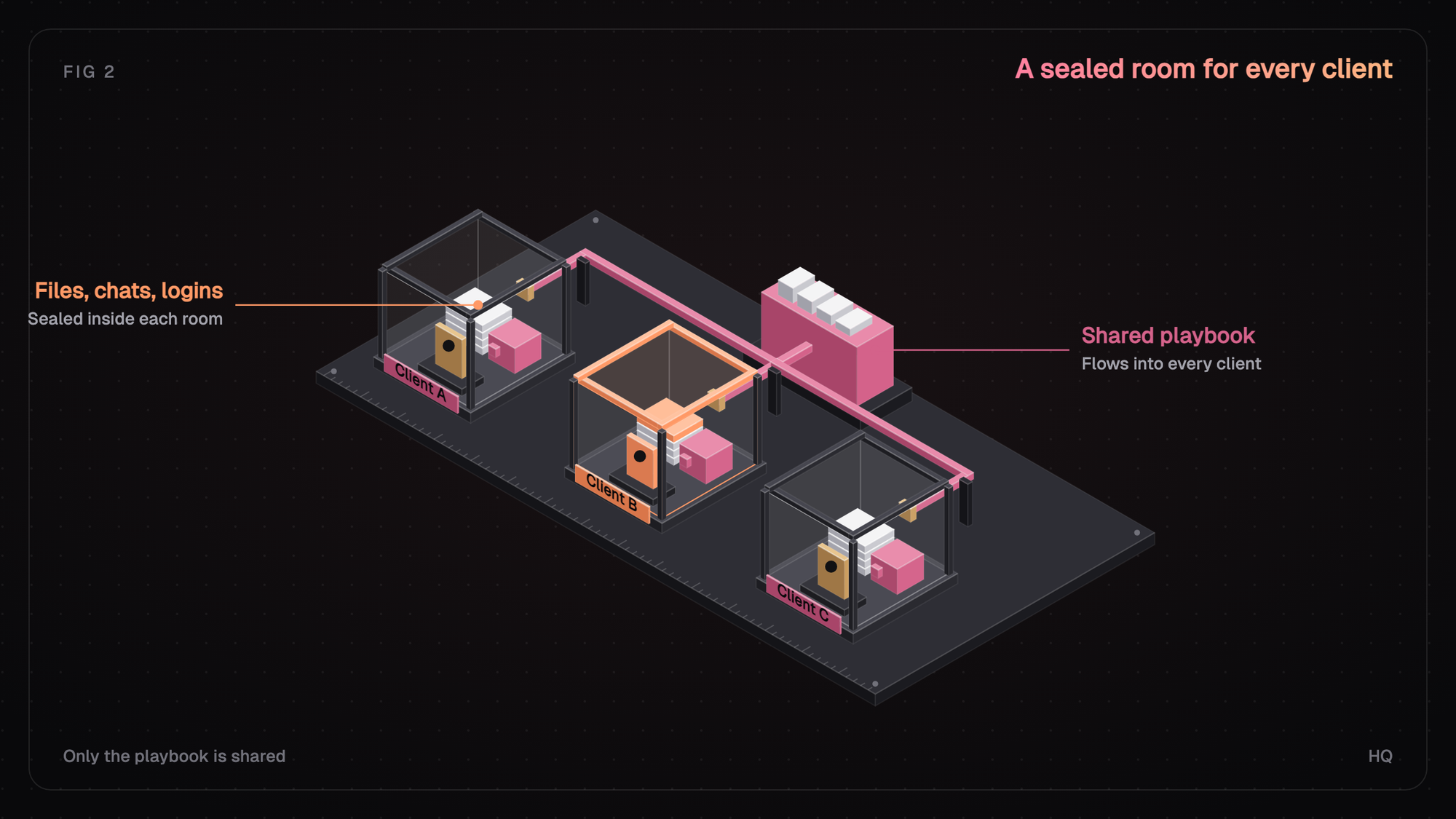
Agencies keep client data separate in Claude by giving every client its own walled-off space that holds that client's files, chats, logins, and history, and keeping the work inside it. That can be a private Project, a Console workspace, or an HQ client workspace. Then check that model training is off on any account that touches client work.
Key takeaways
- Create each client's API keys inside that client's Console workspace, since keys can't move.
- Name one owner per client and review access every month.
- If a contract caps retention, use Enterprise custom retention or a documented API deletion window.
Does Claude keep your client data private?
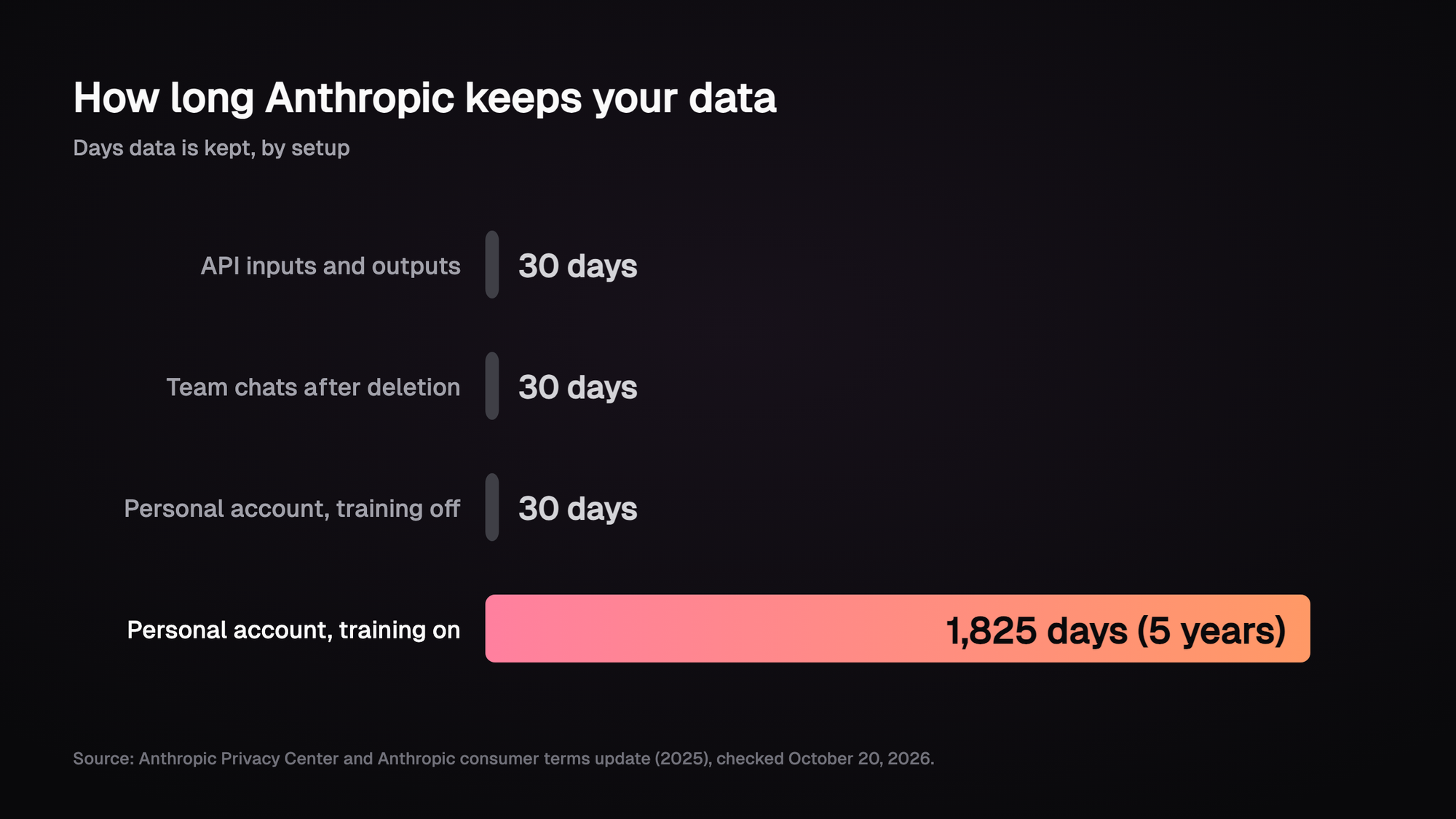
Yes, on the business plans. Anthropic doesn't use inputs or outputs from Claude for Work, the API, or Claude Gov to train models by default [1]. API inputs and outputs are deleted from Anthropic's backend within 30 days, with exceptions such as stored files and legal holds [2].
The catch is feedback. If someone clicks thumbs up or down, that conversation can be used, and feedback is kept for up to five years [1]. Team and Enterprise owners can turn off chat rating for the whole organization.
Where do agency leaks usually start?
Most of them start inside the team. An account manager pastes a client's media plan into a personal Claude Pro account at 11pm because that's the tab that was open.
Personal plans (Free, Pro, and Max) run on different terms. Since Anthropic's 2025 update, each user picks whether chats can train models, and if they allow it, data is kept for five years instead of 30 days [8].
5 years
How long a personal Claude account keeps chats with training on. With it off, it's 30 days.Source: Anthropic, 2025
So the practical step is to check the training setting on every account that touches client work, and switch it off wherever it's on. The bigger question is how to keep clients apart.
How do you stop one client's data from showing up in another client's work?
Give each client its own container and make it the default place people work. Chats inside a Project use that Project's knowledge, and they don't share context with each other unless something's been added to that knowledge [5].
On Team and Enterprise, a Project can be Private, so only you and members you invite can see it, or open to the whole organization [5]. That means mixing usually happens through people:
- the wrong file uploaded to the wrong Project
- an org-wide Project that should've been private
- a prompt that quotes last week's work for another brand
Most mixing between clients happens when a person puts a file in the wrong place.
What setup works for a 10 to 50 person agency?
You can put this in place in about a week:
- One private Project per client. Name it the same way every time ("Client: Acme"), set it to Private, and invite only the account team.
- One owner per client. That person decides what goes into the Project and who's invited. When they leave the account, ownership moves on day one.
- Keep your agency method apart from client content. Templates and checklists get copied into each client's Project. Client files never go back the other way.
- For API work, one Console workspace per client. Keys belong to the workspace they're made in and can't be moved, and an organization can have up to 100 workspaces [6]. Set a monthly spend limit per workspace so billing lines up.
- Review access every month. Remove freelancers when a project ends, and check no client Project has gone organization-wide.
With the containers set up, clients will still ask you one question about them in every security review.
Does Claude train on your data?
Not on business plans by default. Anthropic only uses commercial inputs and outputs for training if you choose to allow it, and the main exception is feedback someone deliberately submits [1]. Its API docs say retained data is never used for training without your express permission [4].
What should you hand a client's security team?
Keep a one-page answer with links to Anthropic's pages. It should cover:
- which plan you're on
- whether training is off, and whether chat rating is off
- how long data is kept
Point their security team to Anthropic's Trust Center for the SOC 2 report. Anthropic lists SOC 2 Type I and Type II, ISO 27001:2022, and ISO/IEC 42001:2023 for its commercial products [7]. Retention is the part of that page that changes most by product, so it's worth its own look.
What data retention should an agency plan for?
Plan around the product your team actually uses. Each one keeps data differently. Here's how they compare for client work, based on Anthropic's pages as of October 20, 2026.
Setup
Claude Free, Pro, or Max
Trains by default?
User's choice
How long data is kept
30 days, or 5 years if training is on
Built-in client separation
None you control
Setup
Claude Team
Trains by default?
No
How long data is kept
History kept in product; deleted chats gone within 30 days
Built-in client separation
Private Projects
Setup
Claude Enterprise
Trains by default?
No
How long data is kept
Indefinite by default; custom period of 30 days or more
Built-in client separation
Private Projects, retention controls
Setup
Claude API (Console)
Trains by default?
No
How long data is kept
Deleted within 30 days; ZDR by request
Built-in client separation
One workspace per client
Setup
HQ client workspaces on Claude
Trains by default?
No
How long data is kept
Follows the Claude plan or API terms you use
Built-in client separation
One company per client with its own files, people, bots, and keys
What if a contract sets a deletion deadline?
Team's default history won't meet it on its own. Enterprise keeps chats and projects indefinitely unless an admin sets a custom period, and the shortest is 30 days [3]. API use with a documented deletion window works too.
Zero data retention (ZDR) is available for eligible API use through Anthropic sales. Team and Enterprise chat aren't eligible, apart from Claude Code on Enterprise [4]. Some newer "Covered Models" need 30-day retention, so check eligibility before you promise ZDR [4].
Quick check: open your Claude Projects list now and sort by visibility. Any client Project that isn't marked Private is the first thing to fix.
Once you know the rules, it helps to test each client against them.
Is each client actually separate?
Run this checklist once per client. If any line is a no, fix it before the next piece of work goes in.
Check
Training is off on every account that touches this client's work
Yes / NoThe client has its own private Project or workspace, with only the account team invited
Yes / NoThe client's API keys live in that client's workspace and nowhere else
Yes / NoNo client files sit in shared templates or other clients' Projects
Yes / NoThere's a named owner and a backup owner
Yes / NoFreelancers and past team members have been removed
Yes / NoYou can show the plan, the training setting, and the retention period
Yes / NoThe native tools cover files and chats well. The gaps show up around them: keys pasted into chats, bots that can see every client, and account history that lives in one person's head. For bots, see how to give an AI agent access to one client's data only.
How does this work in HQ?
In HQ, each client is its own company workspace, so people don't have to move onto one shared account to keep clients apart. It holds the client's knowledge, projects, people, bots, tools, credentials, and history, and none of it mixes with another client's by default.
Your agency's methods, like the reporting skill or the brief format, are shared on purpose. You build them once and run them inside each client's workspace with only that client's context.
Teammates and bots share connected tools securely through granted access instead of pasting raw keys. Access is still something you grant deliberately, and anything leaving a client workspace should get a human review first.
How do you start?
Set up one client fully. Create the workspace, add its core context and one connected tool, apply one agency skill, and have a second teammate pick it up without a catch-up call. See Run isolated client and brand workspaces for the walkthrough, or Share AI skills with your team for running one agency skill across clients.
FAQ
Does Claude keep your data private?
On Claude Team, Enterprise, and the API, Anthropic doesn't train on your inputs or outputs by default. Personal plans let each user decide, so check that training is off on any account used for client work.
Does Claude train on your data?
Not on commercial plans by default. The exception is feedback, like a thumbs up or down, and Team or Enterprise owners can turn that off for the organization.
How long does Claude keep data for firms?
API inputs and outputs are deleted within 30 days unless you have ZDR. Enterprise keeps chats until an admin sets a period of at least 30 days. Team keeps history in the product and removes deleted chats within 30 days.
Should an agency use one Claude account per client?
It isn't needed, and neither is moving everyone onto one shared account. What matters is that each client's files, chats, logins, and history sit in their own walled-off space. In HQ, each client gets its own company workspace for that.
Is Claude SOC 2 compliant?
Anthropic lists SOC 2 Type I and Type II, ISO 27001:2022, and ISO/IEC 42001:2023 for its commercial products. You can request the reports through the Anthropic Trust Center.
Sources (9)
Pages 1 to 7 checked October 20, 2026.
- Anthropic Privacy Center, Is my data used for model training?.
- Anthropic Privacy Center, How long do you store my organization's data?.
- Claude Help Center, Organization data retention controls.
- Claude API docs, API and data retention.
- Claude Help Center, How can I create and manage projects?.
- Claude Help Center, Creating and managing workspaces.
- Anthropic Privacy Center, What certifications has Anthropic obtained?.
- Anthropic, Updates to our consumer terms, 2025.
- Anthropic, Trust Center.
Last updated October 23, 2026. Facts checked October 20, 2026.