Team Claude skills should live in one source copy, then reach people where they work. For a software company where most people use the Claude app, org skills on the Team or Enterprise plan are the simplest home. Engineering skills that change with the code belong in a GitHub repo. If your team also uses Codex or ChatGPT, or non-engineers need to edit skills, keep the source in a shared folder every tool can read.
Key takeaways
- Pick one place where each skill gets edited, and treat every other copy as read-only.
- Org skills reach the Claude app and signed-in Claude Code, but recipients can't edit them.
- Claude Code and Codex read skills from different repo folders, so a repo needs both.
Our example is a 60-person software company. Twelve engineers use Claude Code and a few of them also use Codex. Sales, CS and marketing work in the Claude app on the Team plan, and nobody agrees yet on where the call-prep skill and the release-notes skill should be kept.
What are the three places a team can keep Claude skills?
Teams keep Claude skills in org skills, in a GitHub repo, or in a shared folder. Each option is a different answer to two questions: which tools load the skill, and who's allowed to change it.
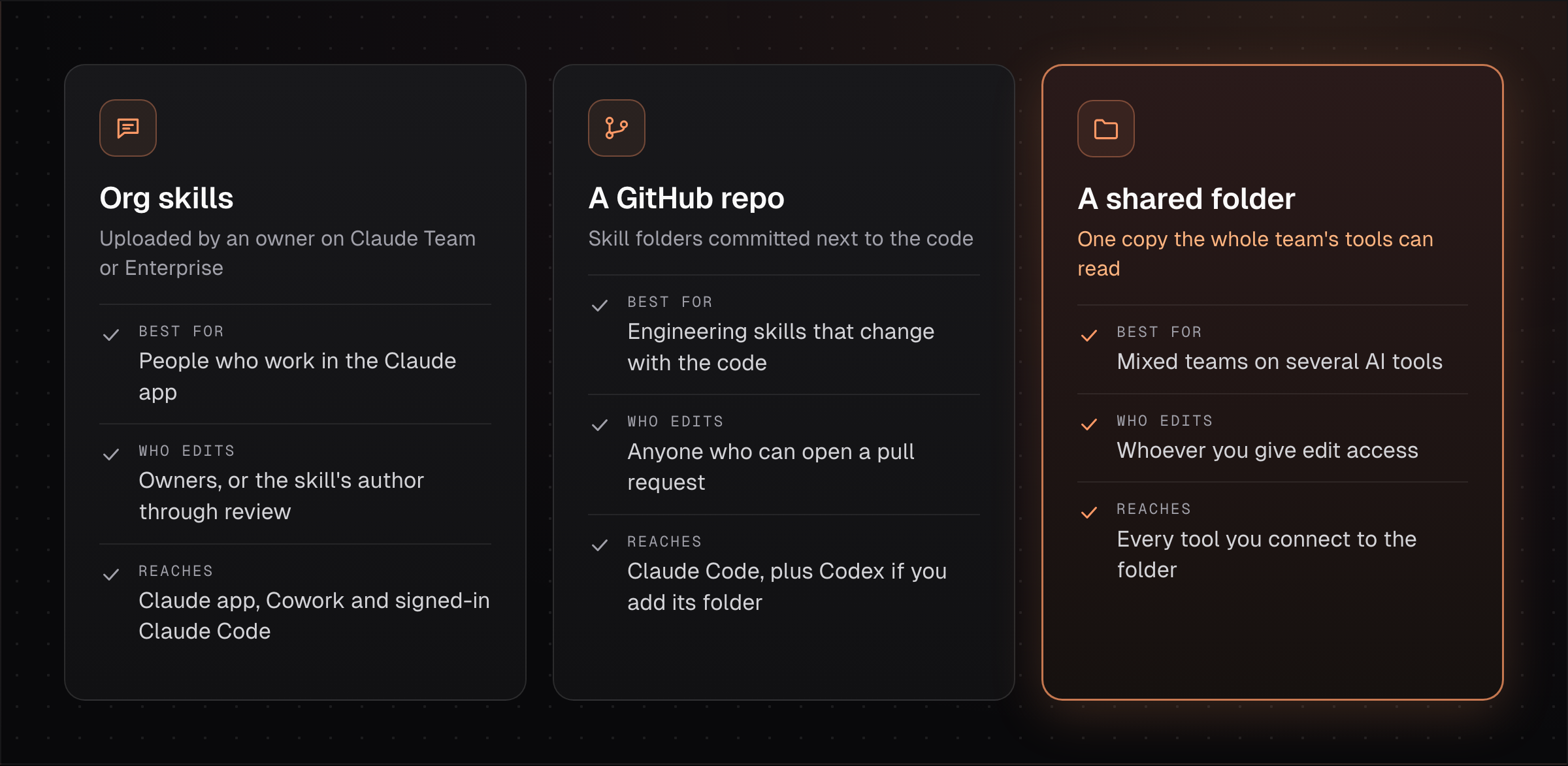
All three hold the same thing underneath. A skill is a folder with a SKILL.md file that has a name, a description and instructions, a format Anthropic released as an open standard called Agent Skills [1]. Because the format is shared, moving a skill between these places is a copy, with no rewrite needed.
The choice mostly comes down to where the people using each skill already work, starting with the Claude app.
When are org skills the right home?
Org skills are the right home when most of the people using a skill work in the Claude app and a few owners maintain it. On the Team and Enterprise plans, an owner uploads a zip file containing a SKILL.md and provisions it for everyone [2].
Recipients can turn a provisioned skill off for themselves but can't edit or delete it [2]. Teammates can also submit skills to the organization library, and the owner can require review before they're published. On the Enterprise plan, each third-party skill can be scanned for malicious content first [2].
Org skills also reach engineers. Claude Code v2.1.273 and later loads them for anyone signed in with their Claude account [3].
10
Roughly how many minutes pass between Claude Code's checks for changes to synced org skills.Source: Claude Help Center, Use skills in Claude, checked November 16, 2026
The sync only goes one way. Claude Code downloads synced skills and never uploads them, and local edits are overwritten on the next sync [4]. It also skips sessions that use an API key or Amazon Bedrock [3]. Org skills need the Team plan or above, where a Claude Team Standard seat is $25 a month billed monthly or $20 billed annually [5].
For our example, org skills suit the call-prep skill. The release-notes skill is a different case, because it changes whenever the code does.
When does a GitHub repo make more sense?
A GitHub repo makes more sense for skills that describe how a codebase works and should change in the same pull request as the code. Claude Code reads project skills from .claude/skills in the repository, and committing that folder shares the skills with everyone who clones it [4].
Two details trip teams up. Claude Code gives a personal skill priority over a project skill with the same name, so an old copy in someone's home folder quietly wins [4]. Codex looks for skills in a different folder, .agents/skills, though it reads the same SKILL.md format [6].
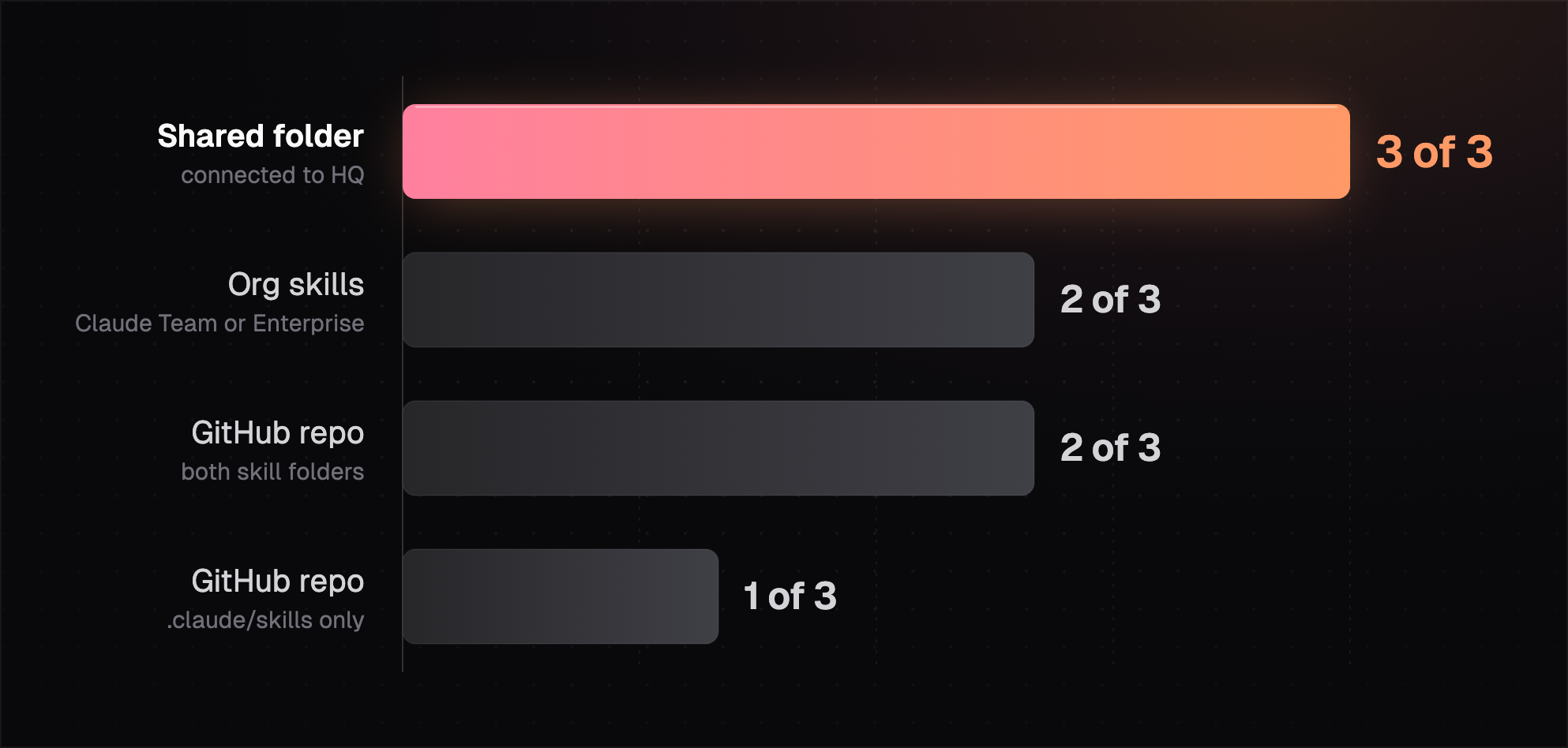
Each skill needs one copy that gets edited and one person who edits it.
A rep in the Claude app can't use a skill sitting in a repo, so the call-prep skill doesn't belong there. When the same skill has to reach both groups, the question shifts to where its one editable copy lives.
How do you keep one copy when a team uses several tools?
To keep one copy across several tools, choose a single source location for each skill and have every other place read from it or receive copies from it. Without that rule, the version in the Claude app, the one in the repo and the one on a laptop drift apart.
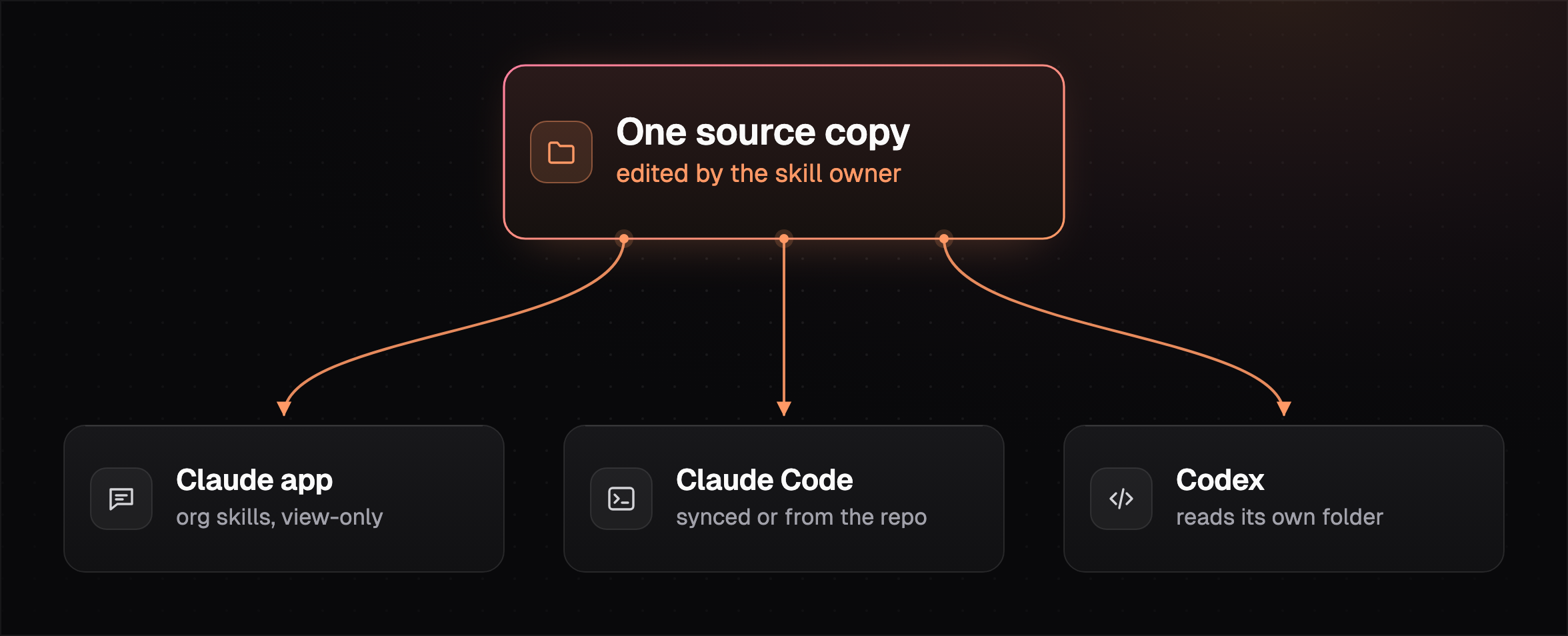
Give each skill a named owner, the person who folds in teammates' edits. When skills come from several places, Claude Code loads enterprise skills over personal ones and personal over project ones [4], so delete stray personal copies once the shared one exists.
Quick check: pick your three most used skills and ask two teammates where they load each one from. Any skill with two answers has two copies, and one of them is out of date.
A shared folder is the simplest source for a mixed team, as long as each tool can actually read it.
How this works in HQ
HQ keeps one copy of each skill in your company's shared space.
- Engineers run it from Claude Code or Codex.
- Sales and CS run the same skill from Claude or ChatGPT.
- Anyone can improve it, or you can lock it to a few people.
See sharing AI skills with your team, or read which skills to roll out first. You can start free with $10 of usage a month.
FAQ
Do Claude org skills show up in Claude Code?
Org skills show up in Claude Code v2.1.273 and later when you sign in with your Claude account, and they sync one way from the Claude app [3]. Sessions that use an API key or Amazon Bedrock don't get them.
Can teammates edit an org skill?
Teammates can't edit a provisioned or shared org skill, since recipients get view-only access [2]. They can edit their own copy of a published skill and submit a new version for review.
Where do Claude Code project skills go in a repo?
How do I share Claude skills without GitHub?
You can share Claude skills without GitHub through org skills on the Team or Enterprise plan, or through a shared folder your team's tools connect to. Our post on sharing Claude skills without GitHub walks through both.
Sources (6)
- Agent Skills overview, agentskills.io, checked November 16, 2026.
- Provision and manage skills for your organization, Claude Help Center, checked November 16, 2026.
- Use skills in Claude, Claude Help Center, checked November 16, 2026.
- Skills, Claude Code docs, checked November 16, 2026.
- Claude pricing, checked November 16, 2026.
- Build skills, Codex docs, OpenAI, checked November 16, 2026.
Last updated November 16, 2026. Facts checked November 16, 2026.