To automate client reports across many accounts, an agency needs a connector that pulls each client's numbers on a schedule, one template every report follows, and an AI step that writes the summary from that client's own goals and history. Tools like Looker Studio, AgencyAnalytics and Supermetrics handle the numbers, while the written summary takes most of the hours and only comes out right when each client's files are kept apart. An account lead checks every report before it's sent.
Key takeaways
- Reporting tools pull the numbers well, and the commentary for each client is still left to your team.
- AI writes a better summary when it reads one client's goals and past reports and nothing from other clients.
- Take the numbers from the data source and the words from the AI, and review each report before it's sent.
Our example is a 30-person performance agency with 25 retainer clients. Every Monday the account team exports ad and analytics data, pastes it into slides and writes a paragraph on what changed, and across 25 clients that takes most of the day.
What does automated client reporting actually automate?
Automated client reporting covers two jobs: collecting each client's numbers and explaining them. Dashboards and connectors have handled the first job for years, and agencies now say the second job is where AI helps them most.
In the 2026 Marketing Agency Benchmarks survey of 494 agency professionals, reporting and performance summaries ranked as the area where AI adds the most value, picked by 42% of respondents [1]. A year earlier, content creation held that spot at 58% [1].
42%
Share of agency professionals who say reporting is where AI adds the most value.Source: AgencyAnalytics 2026 Marketing Agency Benchmarks, checked November 16, 2026
Reports also affect whether clients stay. In AgencyAnalytics' 2025 survey of more than 220 agency leaders, 70% rated client reporting as extremely important for retention [2].
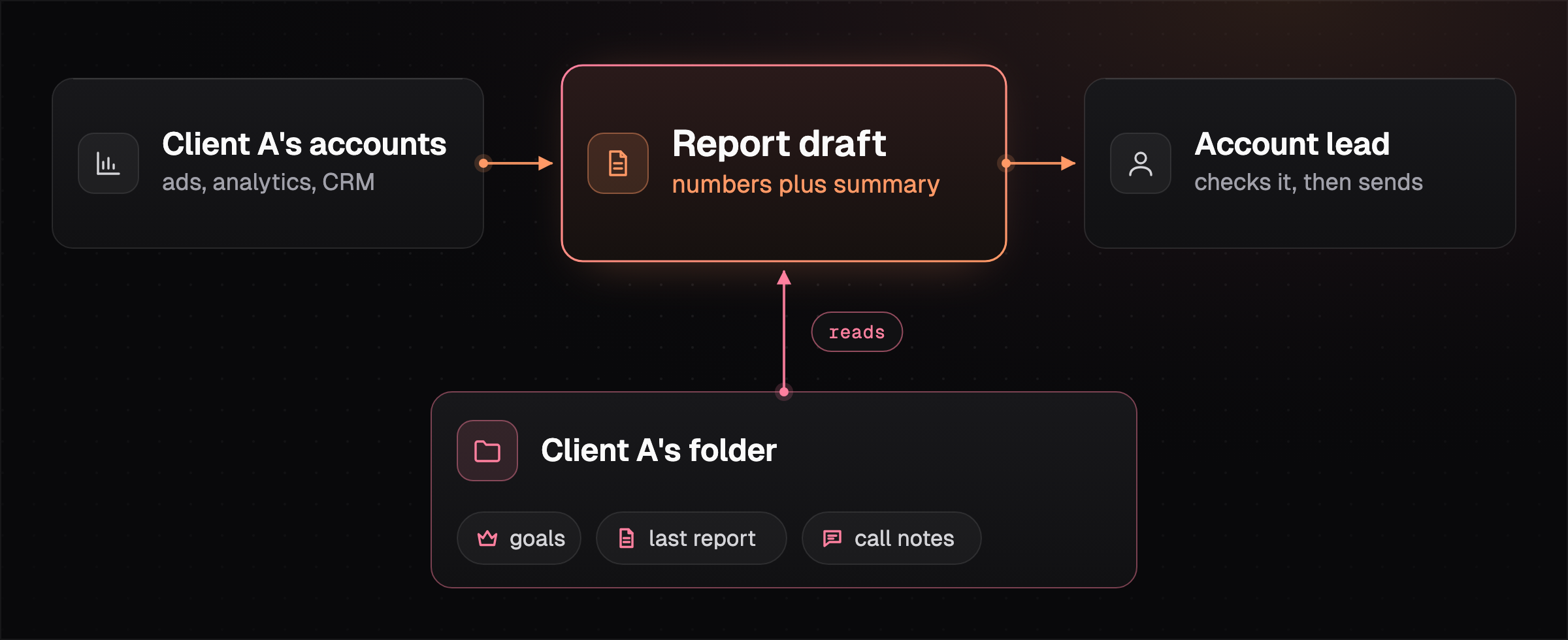
Once the two jobs are split, the agency picks a tool to pull the numbers for all 25 accounts.
Which tools handle the numbers across many client accounts?
Agencies pull client numbers with a free dashboard tool, a reporting platform priced per client, or a data connector priced by sources and accounts. All three can send reports on a schedule, and they differ on what they cost at 25 clients and on how much of the write-up they leave to you.
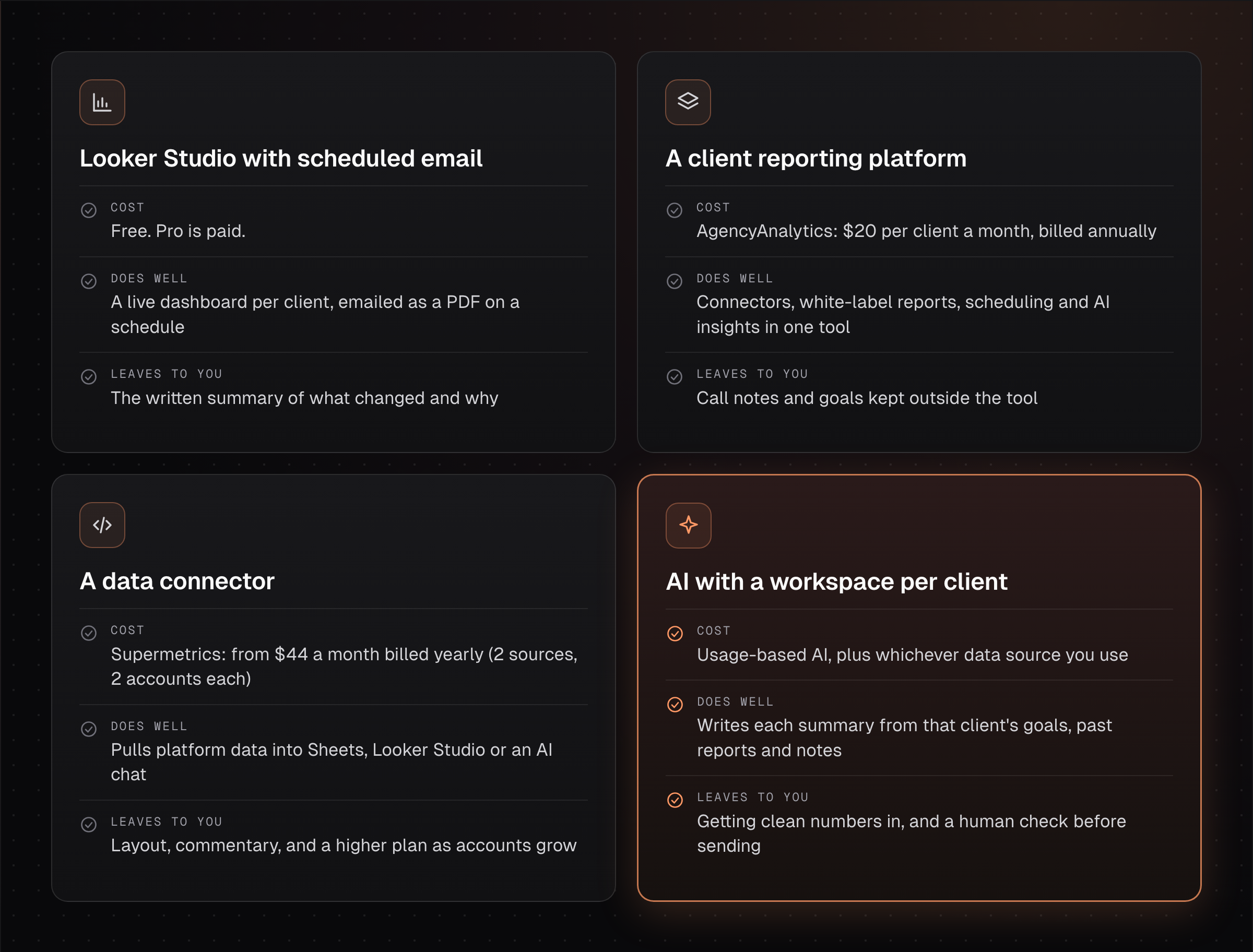
Looker Studio can email a report as a PDF on a schedule to as many as 50 recipients. Without Looker Studio Pro, each report gets one schedule and sends at most once a day [3].
AgencyAnalytics' Core plan is $20 per client a month, billed annually, and includes report scheduling and AI insights [4]. For our 25-client agency, that's $500 a month. The pricing page sends agencies with more than 25 clients to custom volume pricing [4].
Supermetrics Starter is $59 a month billed monthly or $44 billed yearly, with 2 data sources and 2 accounts per source. Growth is $222 or $177, with 7 of each [5]. For 25 ad accounts on one platform, an agency would need a quote for the Enterprise plan.
Whichever tool pulls the numbers, someone still writes the summary paragraph for each client, and that's the part AI can draft.
How do you get AI to write the summary without mixing up clients?
AI writes a reliable client summary when it reads only that client's numbers, goals and history. When several clients' exports are pasted into one chat, a summary can end up quoting the wrong account's results.
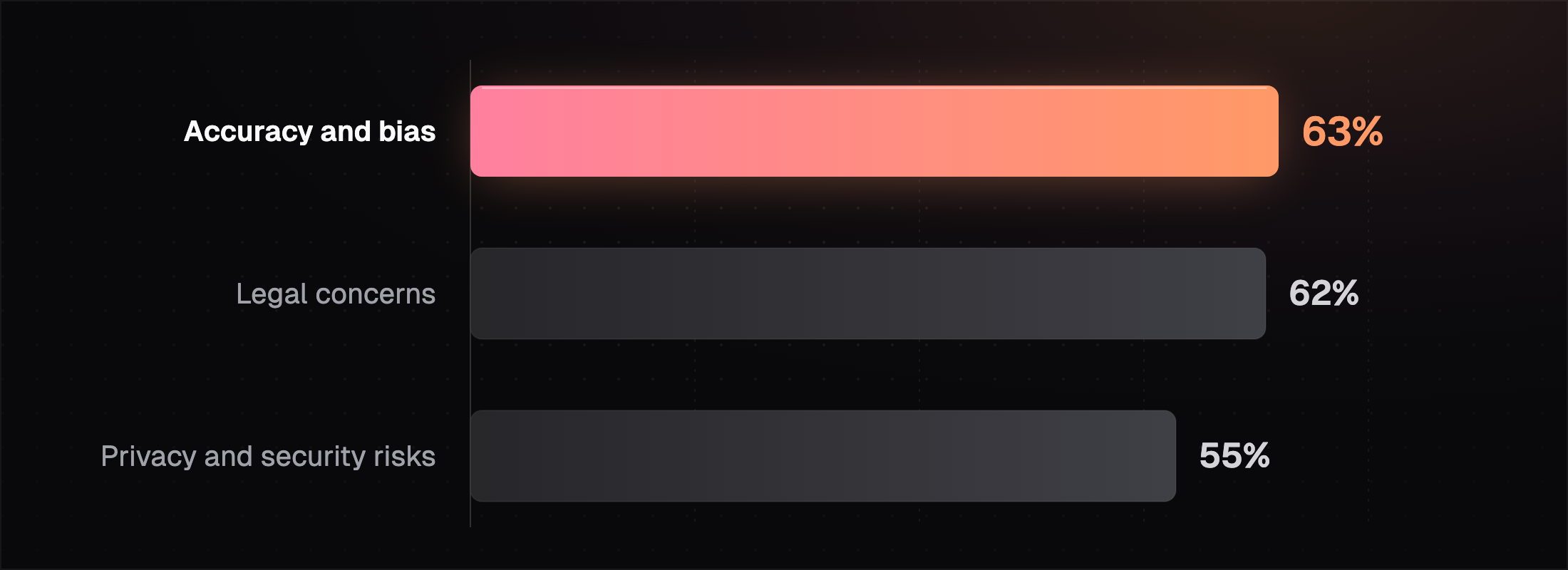
Agencies have reasons to be careful. In Forrester's 2026 study with the 4As, nine in 10 US agencies use generative AI, and 74% use it to summarize documents and communications [6]. The barriers agencies name most are accuracy and bias, legal concerns, and privacy and security risks.
Keep a folder for each client with their goals, last month's report and recent call notes, and point the AI at that folder alone. Then let the numbers come straight from the connector, so the AI explains them without retyping them.
Quick check: open last week's AI-written summary for one client and compare three numbers against the source dashboard. If any differ, the AI is retyping numbers instead of reading them.
We covered folder-per-client setups in more depth in how agencies keep client data separate in Claude. Once each client's files are in place, the rollout takes a few weeks.
How do you roll out automated reports across 25 clients?
The easiest rollout fixes the template first and then adds clients a few at a time. Each step below ends at a point the team can check, so everyone knows when to move on.
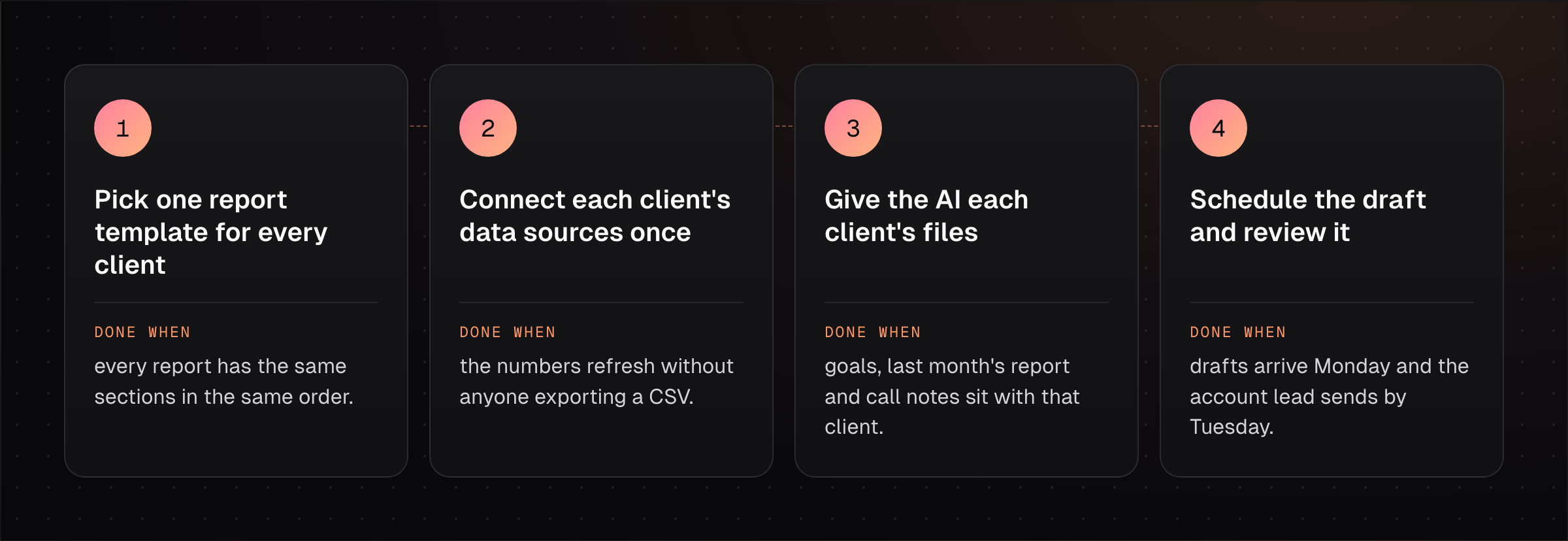
Start with five clients whose accounts are clean, and once their drafts need only light edits for two weeks running, add the next ten and then the rest.
Every client's report still gets read by its account lead before it's sent.
Track how long each review takes, since a falling review time shows the drafts are getting closer to what the account lead would send.
How this works in HQ
HQ gives each client its own workspace, so every report is drafted from that client's goals and notes.
- Account teams only see the clients they work on.
- A bot can draft the weekly report on a schedule for the account lead to check.
- Approved reports can go to the client as a password-protected page.
See automating reports, dashboards and briefs. You can start free with $10 of usage a month.
FAQ
Can ChatGPT or Claude write client reports on their own?
ChatGPT and Claude can write the summary when they have the client's numbers from a connector or export and the client's goals and history beside them. Without the goals and history, the summary describes the numbers and leaves out what that client cares about.
Is Looker Studio enough for automated client reporting?
Looker Studio is enough for scheduled dashboards, since it can email a PDF to as many as 50 recipients on a schedule [3]. Your team still writes the commentary.
How much does client reporting software cost for 25 clients?
A per-client platform like AgencyAnalytics comes to about $500 a month for 25 clients at $20 each, billed annually [4]. Looker Studio is free without Pro, and connector pricing depends on how many sources and accounts you pull.
Should automated reports go to clients without review?
Automated reports should get a human check before they're sent, and we'd keep that check in place for every client. Accuracy is the top AI concern for agencies, named by 63% in Forrester's 2026 study [6].
Sources (6)
- 2026 Marketing Agency Benchmarks Report press release, AgencyAnalytics, June 30, 2026, checked November 16, 2026.
- Marketing Agency Benchmarks 2025, AgencyAnalytics, September 9, 2025, checked November 16, 2026.
- Schedule automatic report delivery, Google Cloud Looker Studio documentation, checked November 16, 2026.
- AgencyAnalytics pricing, checked November 16, 2026.
- Supermetrics pricing, checked November 16, 2026.
- The State of AI Inside US Marketing Agencies, 2026, Forrester with the 4As, June 24, 2026, checked November 16, 2026.
Last updated November 16, 2026. Facts checked November 16, 2026.