For a 10 to 50 person company, Claude Team covers most needs at $20 to $25 a seat a month. Claude Enterprise adds SCIM, audit logs, custom data retention and per-user spend limits, starts at 20 seats and bills usage at API rates on top. A shared workspace like HQ sits beside either plan and gives teammates on ChatGPT, Codex or Cursor the same company files.
Key takeaways
- Claude Team and Claude Enterprise both list $20 a seat billed annually, and the Enterprise plan adds usage billing.
- Below 20 people, the Enterprise plan means paying for seats nobody uses.
- A shared workspace runs alongside a Claude plan and reaches teammates on other AI tools.
Our running example is a 30-person professional services firm. It has 22 consultants in Claude, 5 analysts who prefer ChatGPT, 3 engineers in Claude Code and Codex, and one large client whose security questionnaire asks about audit logs.
How do Claude Team, Claude Enterprise and a shared workspace compare?
Claude Team and Claude Enterprise are two tiers of the same Claude product, and a shared workspace is a separate tool that works with both. The cards below use the same rows for each option, with prices and features from Anthropic's pricing pages and HQ's live pricing [1] [2] [3].
Option 1
Claude Team
Price: $20 a seat billed annually, $25 billed monthly
Team size: 2 to 150 seats
Admin: SSO, central billing and usage analytics
Compliance: audit logs and SCIM aren't listed
AI tools covered: Claude and Claude Code
Option 2
Claude Enterprise
Price: $20 a seat billed annually, plus usage at API rates
Team size: 20 seat minimum
Admin: everything in Claude Team, plus role-based access and spend limits
Compliance: SCIM, audit logs, Compliance API and custom retention
AI tools covered: Claude and Claude Code
Option 3
Shared workspace (HQ)
Price: start free with $10 of usage included every month
Admin: access by person and by group in each company workspace
Compliance: runs alongside your Claude plan's controls
AI tools covered: Claude, Claude Code, ChatGPT, Codex and Cursor
The rows that differ most are compliance and which AI tools are covered, so the next sections cover the upgrade from the Team plan to the Enterprise plan first and other AI tools after that.
What does Claude Enterprise add over Team?
Claude Enterprise adds identity, compliance and spend controls on top of everything in Claude Team. Anthropic lists these as Enterprise plan additions [1]:
- SCIM for automatic user provisioning and removal.
- Audit logs and a Compliance API for monitoring.
- Custom data retention controls, IP allowlisting and network-level access control.
- Role-based access with fine-grained permissions, and spend limits for each user and the whole organization.
- A HIPAA-ready configuration, available with a BAA from Anthropic [2].
For our 30-person firm, the client questionnaire asking about audit logs is the item that decides it. Audit logs aren't listed on the Team plan, so if that client needs them from the AI vendor, Claude Enterprise is the plan to pick.
Pick Claude Enterprise when a customer or regulator asks for a control that only the Enterprise plan lists.
Cost differs too, since the Team plan charges only for seats and the Enterprise plan charges for seats plus usage.
How does the cost compare at 10, 20, 30 and 50 people?
Claude Team and Claude Enterprise seat prices match from 20 people up, and below 20 the Enterprise plan costs more because of its minimum. Both plans list $20 a seat a month billed annually, and Claude Enterprise bills usage at API rates on top of seats [2].
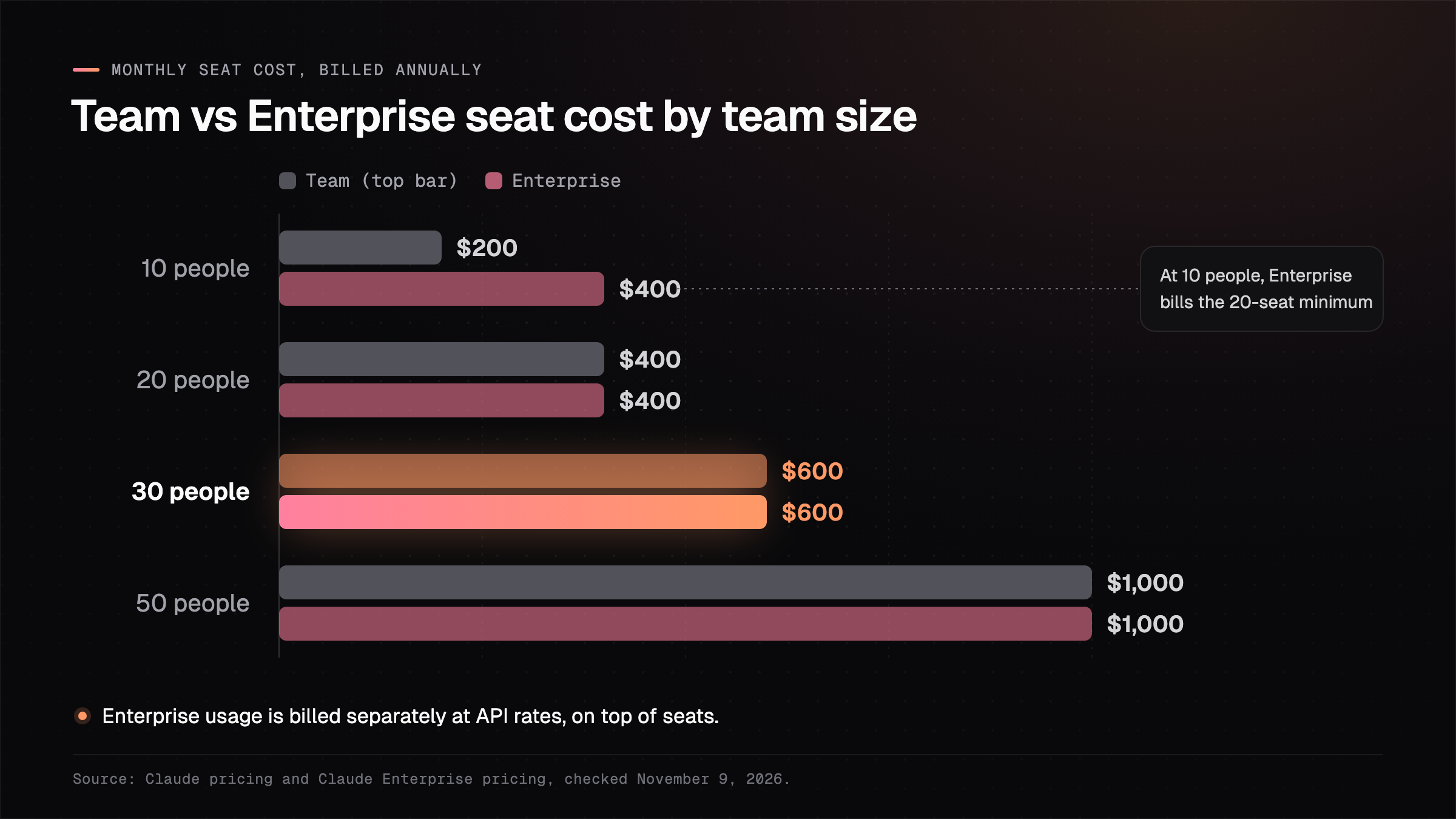
20
Seats is the Claude Enterprise minimum, on an annual commitment.Source: Claude Enterprise pricing, checked November 9, 2026
Our firm pays $600 a month for 30 seats on either plan, and on the Enterprise plan its Claude use is billed on top of that. Anthropic doesn't publish a typical seat-plus-usage total, so ask its sales team for an estimate based on how your team works [2].
Quick check: open your last customer security questionnaire and search it for "audit log", "SCIM" and "data retention". If none of them appear, the Team plan covers what your customers are asking for today.
Neither plan covers our five analysts in ChatGPT, and that's the gap a shared workspace fills.
When does a 10 to 50 person company need a shared workspace too?
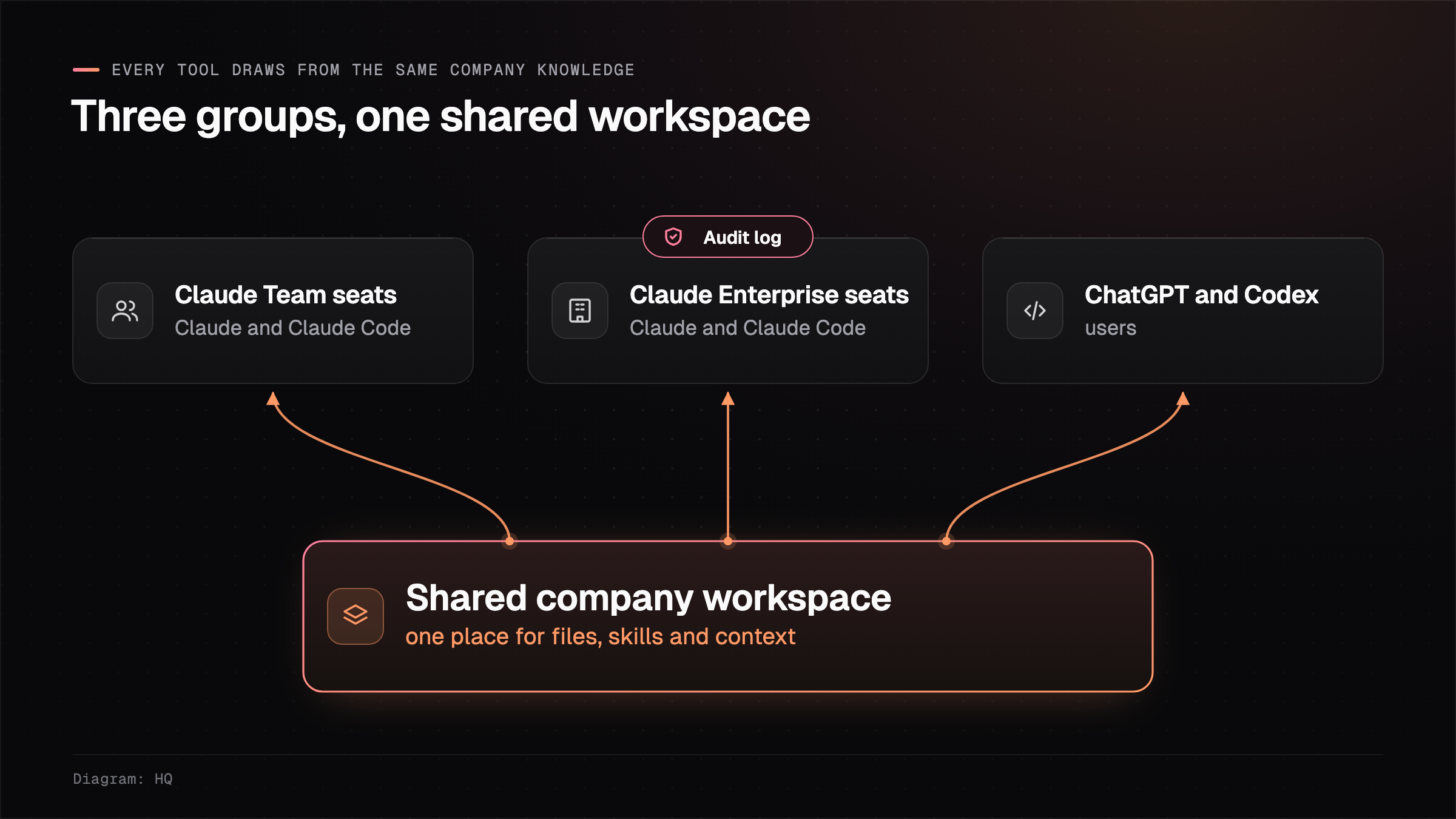
A growing company needs a shared workspace next to its Claude plan when the people who share its work don't all use Claude. Claude Team and Claude Enterprise share projects and skills inside one Claude organization [1], so the analysts in ChatGPT and the engineers working in Codex don't see them.
A shared workspace keeps the company's files, playbooks and skills in one place that each person's AI tool can read. It doesn't replace a Claude plan's admin or compliance controls, so teams run it alongside the Team or Enterprise plan. If you're still deciding whether the Team plan alone is enough, our yes-or-no guide to the Claude Team plan walks through it for a 5 to 50 person team.
How this works in HQ
HQ is a shared folder for your company's files that works with whichever Claude plan you choose. Each company gets its own workspace for its files, playbooks and skills, and teammates connect Claude, Claude Code, ChatGPT or Codex to read and write the same files.
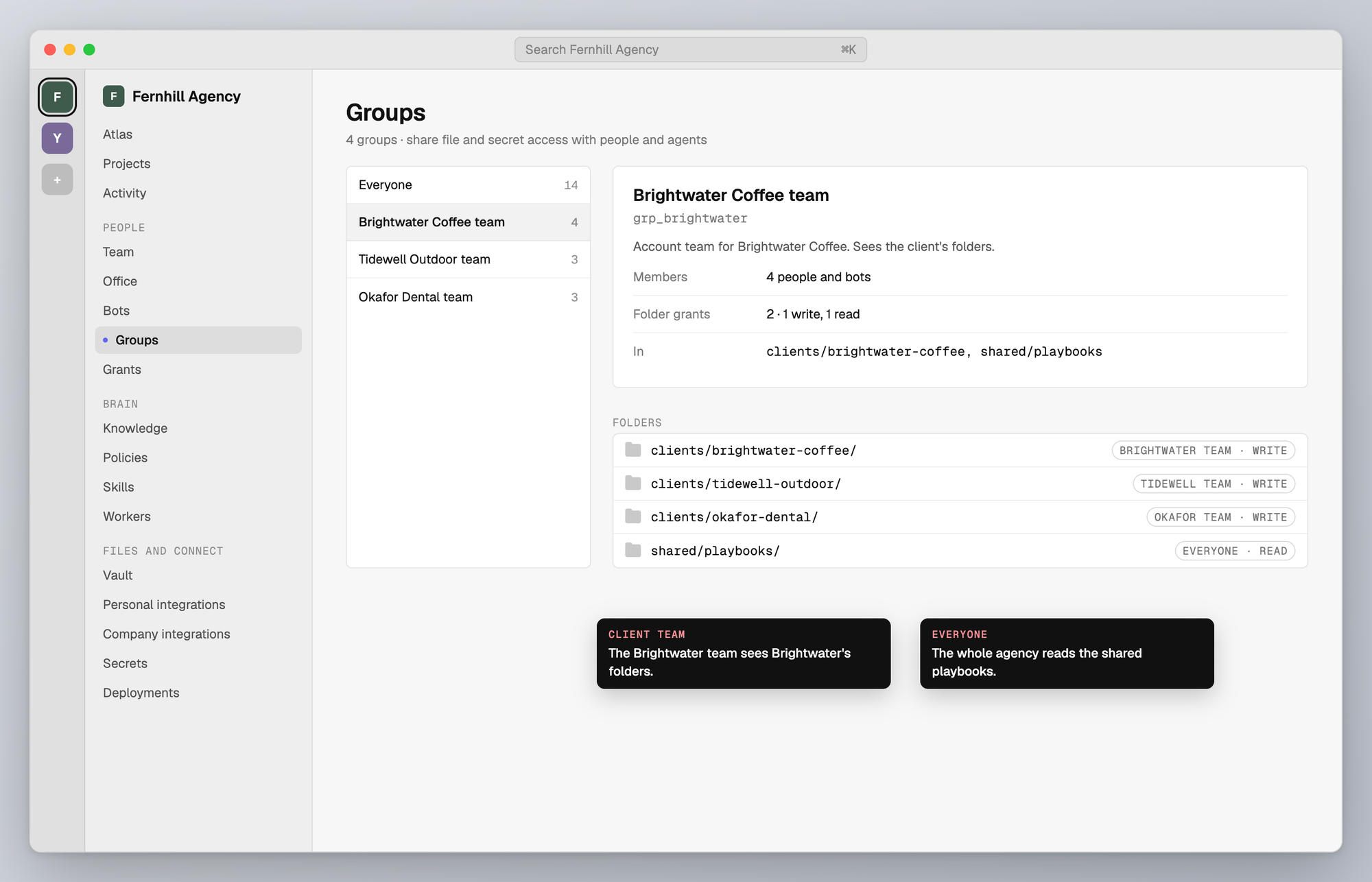
In our 30-person firm, the consultants keep their Claude seats, and the analysts in ChatGPT pull the same client playbooks from HQ. You set access by person and by group, so the team on the large client sees that client's folders and the rest of the firm doesn't.
The firm's API keys and other secrets are stored once in the workspace, where tools use them when they run without showing them back in chat. Read more about governing AI access and knowledge, or see how firms keep client data separate in Claude. You can start free with $10 of usage included every month.
FAQ
How much does Claude Enterprise cost?
Anthropic lists Claude Enterprise at $20 a seat a month billed annually with a 20-seat minimum, plus usage billed at API rates [2].
Does Claude Team have audit logs?
Claude Team doesn't include audit logs, since Anthropic's pricing comparison lists audit logs, SCIM and the Compliance API on the Enterprise plan only [1].
Can a 15-person company buy Claude Enterprise?
A 15-person company can buy Claude Enterprise, but it pays for the 20-seat minimum, so 15 people cost $400 a month in seats before usage [2].
Does a shared workspace replace Claude Team or Enterprise?
A shared workspace works alongside Claude Team or Claude Enterprise. It gives every AI tool on the team the same company files, while the Claude plan still handles Claude seats, admin and compliance controls.
Sources (3)
- Claude pricing, checked November 9, 2026.
- Claude Enterprise pricing, checked November 9, 2026.
- HQ pricing, from the live pricing endpoint, checked November 9, 2026.
Last updated November 9, 2026. Facts checked November 9, 2026.