Teams share Claude skills without GitHub in two built-in ways. On a Claude Team or Enterprise plan, an owner can upload a skill once for the whole organization, and anyone can share a skill they built with chosen colleagues. For agencies with freelancers or people on other AI tools, the third way is one shared skills folder that every teammate's tools can read, including Claude Code and Codex.
Key takeaways
- A skill an owner uploads reaches everyone in your Claude organization at once.
- Shared skills are view-only, and the people you share with get your updates the next time they use them.
- Freelancers and teammates on other AI tools need a shared folder, since built-in sharing stays inside one Claude plan.
To keep this concrete, picture a 15-person agency with a monthly reporting skill every account manager uses and a brand-voice skill for one client, a skincare brand. Both skills are a few pages of instructions, and the question is how to get each one to the right people without anyone opening GitHub.
What's the fastest way to give every teammate the same Claude skill?
The fastest way is to have a Claude owner upload it for the whole organization. On Team and Enterprise, an owner goes to Organization settings, opens Plugins and skills, clicks Add, and uploads the skill as a zip file with a SKILL.md file inside [2].
Claude then provisions the skill to every user in the organization right away [2], so nobody installs anything and nobody touches a repository.
Quick check: open Claude, go to Customize, then Skills, and look for a Share option on a skill you made. If it's there, sharing is already on for your organization, and if it isn't, an owner has to turn it on in the Policy tab first.
For our agency, the monthly reporting skill is a good fit for this route because every account manager needs it. The skincare brand's voice skill is different, since only the people on that account should be running it.
How do you share a skill with only the people on one account?
You share it with chosen colleagues or groups instead of the whole organization. On Team and Enterprise, you can share a skill you built with specific people or groups, or publish it to the organization [1].
A few details matter once you're doing this for client work:
- Shared skills are view-only, so the skincare account team can run the brand-voice skill without editing it by accident [1].
- When you update the skill, everyone you shared it with gets the new version the next time they use it [1].
- Targeting skills at groups through plugins is an Enterprise feature [2].
Skills you turn on in Claude also load in Claude Code when you sign in with the same account, from Claude Code version 2.1.273 [1], which covers the one or two technical people on the team without a separate setup.
Option 1
Owner uploads for everyone
Plans: Team, Enterprise
Reaches: the whole Claude organization
Best for: skills every account manager uses
Option 2
Share with chosen people
Plans: Team, Enterprise
Reaches: named colleagues or groups
Best for: one client's account team
Option 3
Zip files in a shared drive
Plans: any
Reaches: whoever uploads it themselves
Catch: every update means everyone uploads it again
Option 4
One shared skills folder
Plans: works alongside any Claude plan
Reaches: staff and freelancers you invite, in the AI tools each of them connects to HQ
Best for: mixed tools and outside help
Between them, the first two options cover most of the in-house team, and the next question is what that costs.
What does it cost to share skills natively in Claude?
For a 15-person agency, it's $375 a month on Claude Team billed monthly. A Team Standard seat costs $25 a month billed monthly or $20 billed annually, for teams of 2 to 150 [4].
$375
A month for 15 Claude Team seats billed monthly, the entry point for built-in skill sharing.Source: Claude pricing, checked November 5, 2026
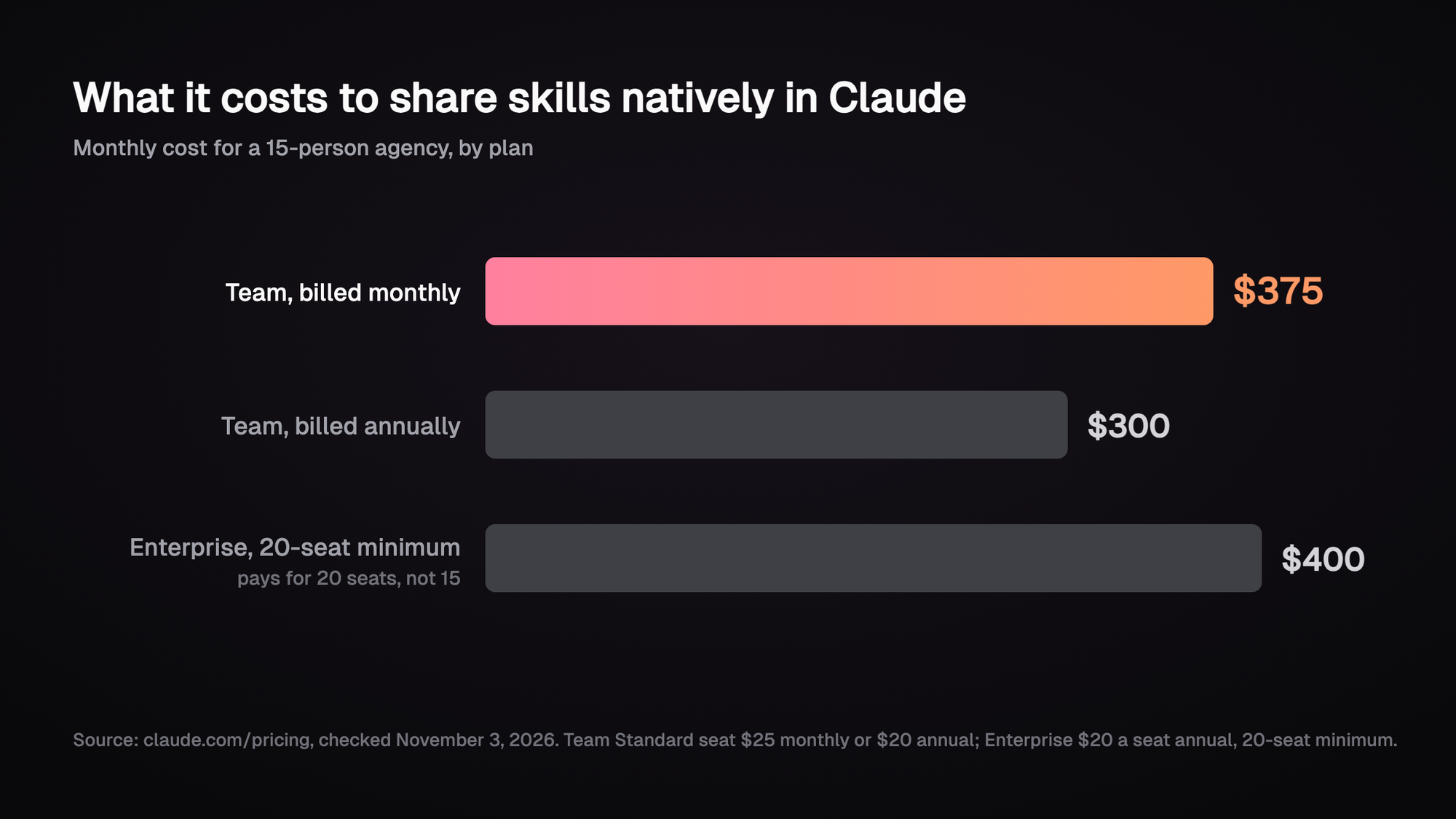
Enterprise lists $20 a seat billed annually with a 20-seat minimum, so a 15-person agency pays for 20 seats there [4]. Every freelancer who needs the skills through Claude's own sharing needs a seat too, and that's where most agencies start looking at other options.
Where do the native options fall short for agencies?
They stop at the edge of one Claude plan. Sharing and publishing happen inside your Claude organization [1], and our example agency has people and tools outside it:
- A freelance copywriter on the skincare account who works from their own Claude account.
- A strategist who drafts in ChatGPT, and a developer who works in Codex or Cursor.
- The skincare brand's own marketing team, who'd like the voice skill you built for them in their setup.
The usual workaround is GitHub. Claude Code reads project skills from a .claude/skills folder, and its docs say to commit that folder so your team gets the skills too [3]. That works well for developers, and most account managers would rather not learn Git to get a reporting template.
A skill that has to reach people outside your Claude plan belongs in a folder those people can open.
That's possible because skills are plain files in an open format. Anthropic released the Agent Skills format as an open standard [5], and Claude Code's skills follow it [3], so one shared folder can feed more than one tool.
How this works in HQ
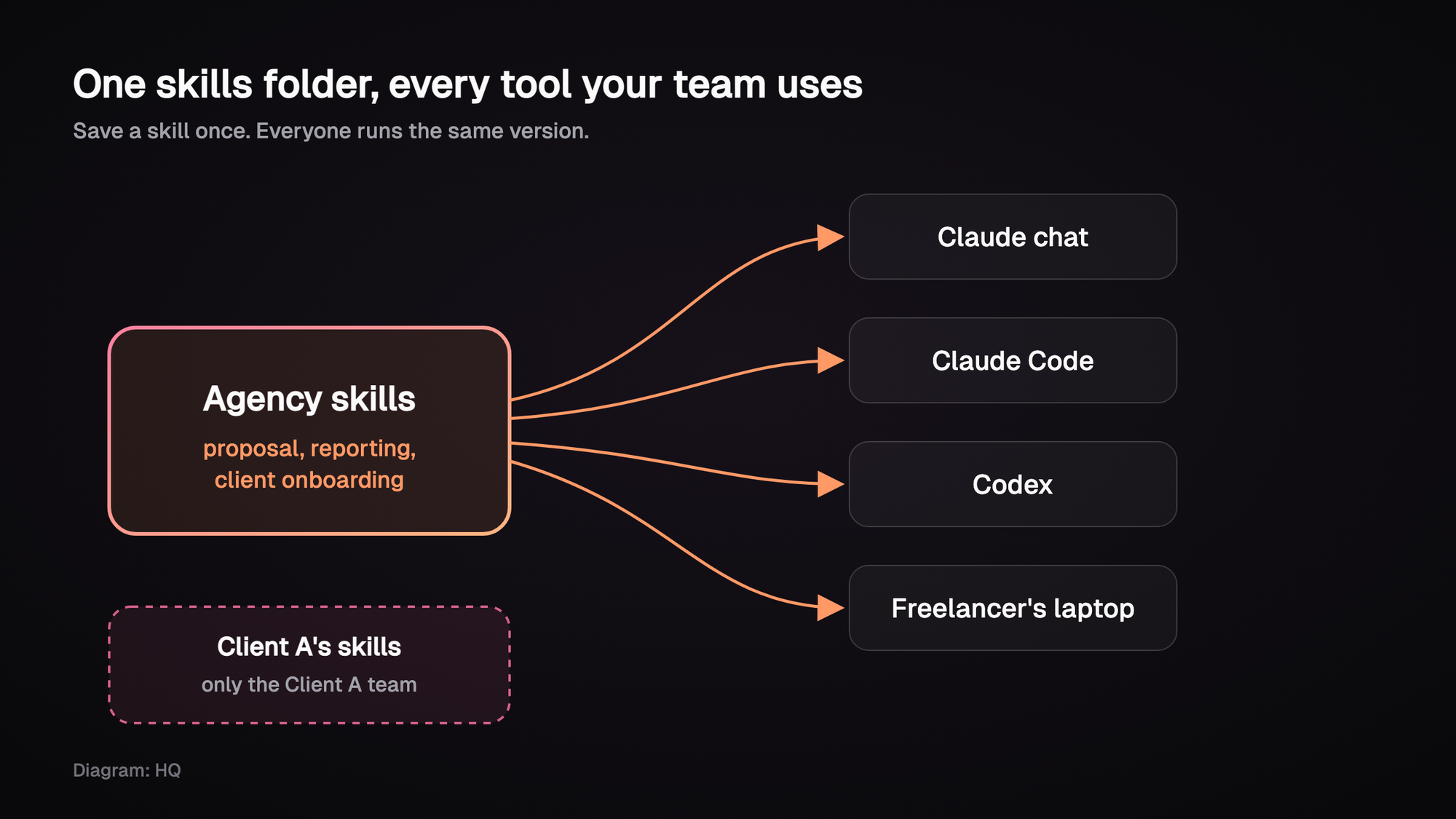
In HQ, your team's skills live in one shared place, next to the rest of the company's files, and HQ keeps everyone's copy in sync. Each person connects the AI tools they already use, whether that's Claude, ChatGPT, Claude Code or Codex, and those tools all work from the same skills.
When the person who owns the monthly reporting skill improves it, everyone gets the new version automatically. Nobody re-uploads a zip file, and nobody ends up running last month's copy.
That works for the agency's own skills, but some skills belong to a single client, and those shouldn't reach the whole team. So each client gets its own space in HQ. The skincare brand's brand-voice skill lives there, where only the people you've added, like the skincare account team and the freelance copywriter, can use it. Every skill is an ordinary markdown file, too, so you can take them with you anytime.
See sharing AI skills with your team and HQ for agencies for more, or start at the install page. You can start free with $10 of usage included every month.
FAQ
Can I share Claude skills on a Pro plan?
Built-in sharing with colleagues is on Team and Enterprise plans [1]. On Pro, people can upload the same skill file to their own accounts, but each update has to be uploaded again by hand.
Can teammates edit a skill I shared?
No, shared skills are view-only for the people you share them with, and they get your updates automatically the next time they use the skill [1].
Do Claude skills work in Claude Code too?
Yes. Skills turned on in your Claude settings, including ones an owner provisioned, load in Claude Code version 2.1.273 or later when you sign in with the same account [1].
How do I give freelancers our agency's skills?
You can give them a seat in your Claude organization, or keep the skills in a shared folder they can reach from their own tools. The folder route also works when they use ChatGPT or Codex.
Further reading
Sources (5)
- Use skills in Claude, Claude Help Center, checked November 3, 2026.
- Provision and manage skills for your organization, Claude Help Center, checked November 3, 2026.
- Skills, Claude Code docs, checked November 3, 2026.
- Claude pricing, checked November 5, 2026.
- Agent Skills, open standard site, checked November 3, 2026.
Last updated November 5, 2026. Pricing checked November 5, 2026. Other facts checked November 3, 2026.