For ops and team leads at companies of 10 to 200: what goes in a team AI operating system, and a one-week setup plan.
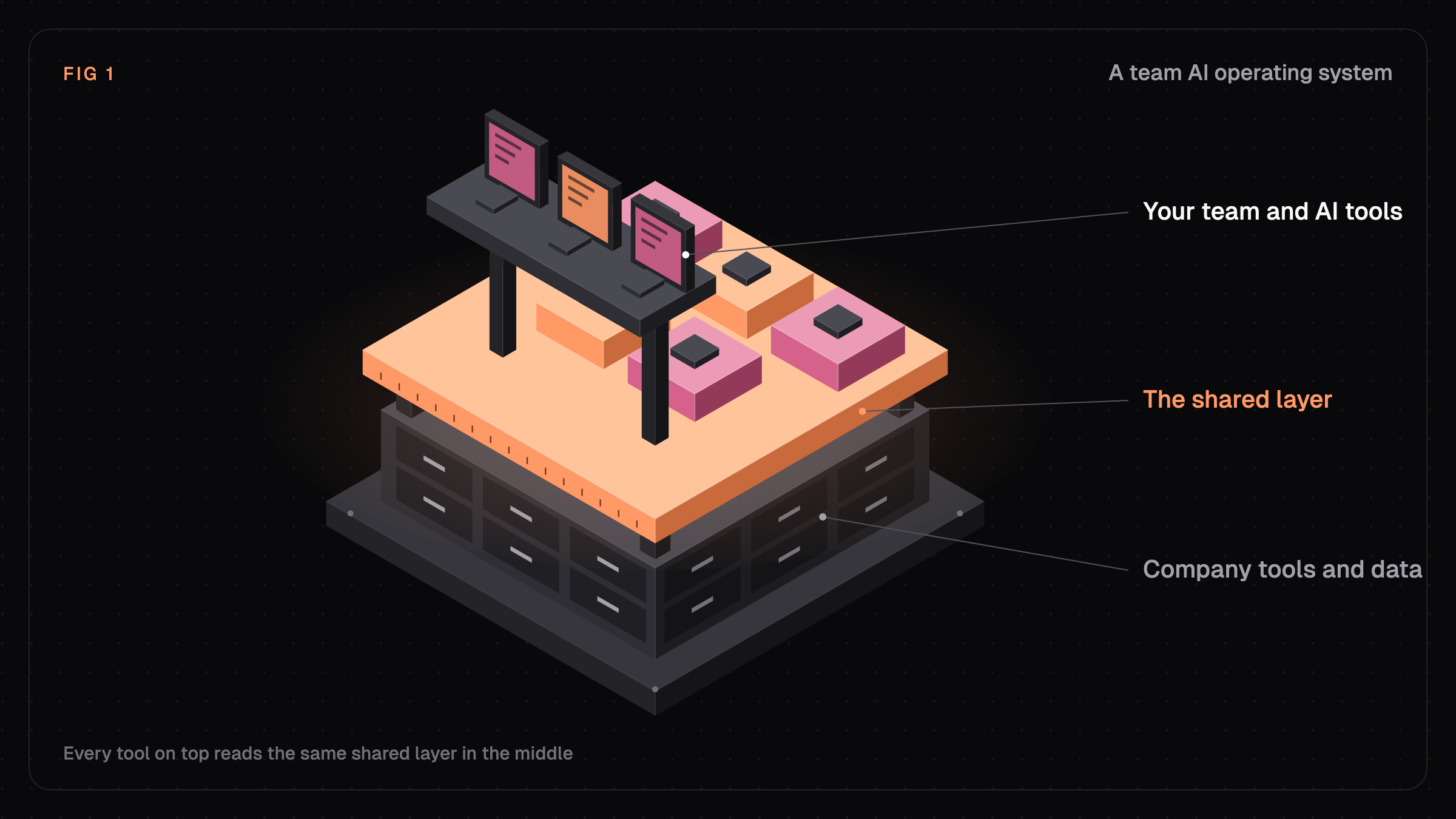
A team AI operating system is the shared layer between a team's people, its AI tools, and its company data. It holds knowledge, reusable skills, projects, access rules, and bots in one place, so every person and every AI session starts from the same context instead of a blank chat.
Key takeaways
- Only 39% of organizations report any profit impact from AI (McKinsey, 2025).
- The gap usually comes from private use: each person re-explains the company to their own chat.
- You can stand up a first version in five working days.
Why do most teams get so little back from AI?
Most teams use AI every day, but almost all of that use is personal. What one person figures out in a chat never reaches the rest of the team, so the company doesn't build anything it can keep.
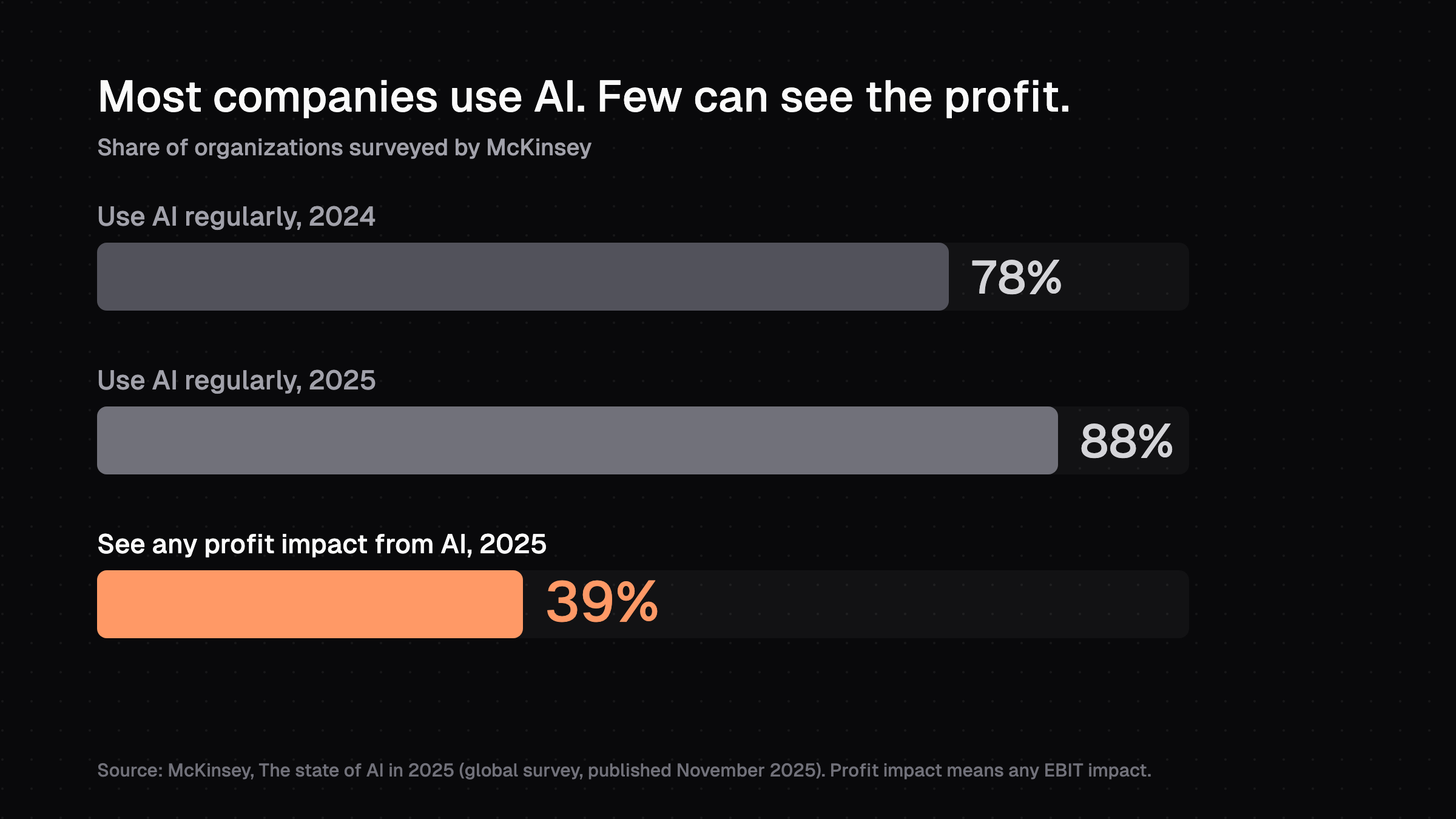
The survey numbers show the same pattern. McKinsey found that 88% of organizations use AI regularly in at least one business function, up from 78% a year earlier.
39%
of organizations report any EBIT impact from AI, and most of them say it's under 5% of EBIT.Source: McKinsey, The state of AI in 2025
What does the worker side look like?
Microsoft and LinkedIn's 2024 Work Trend Index puts numbers on the private-use habit:
- 75% of knowledge workers use generative AI at work.
- 78% of those AI users bring their own AI tools to work.
- 60% of leaders worry their organization doesn't have a plan and vision for AI.
Atlassian adds the cost. In its State of Teams 2025 survey of 12,000 knowledge workers and 200 executives, teams spent 25% of their time just searching for answers. So what would a shared fix look like?
What is a team AI operating system, in plain terms?
It's the part of your AI setup that belongs to the team instead of to one person. A chat app gives each person a private assistant, and a team AI operating system gives the whole team a shared memory and shared tools that any of those assistants can use.
Most "AI operating system" articles are written for enterprises, where IT runs a platform for thousands of employees. The team version is for a company of 10 to 200 where everyone already has good models and the problem is context.
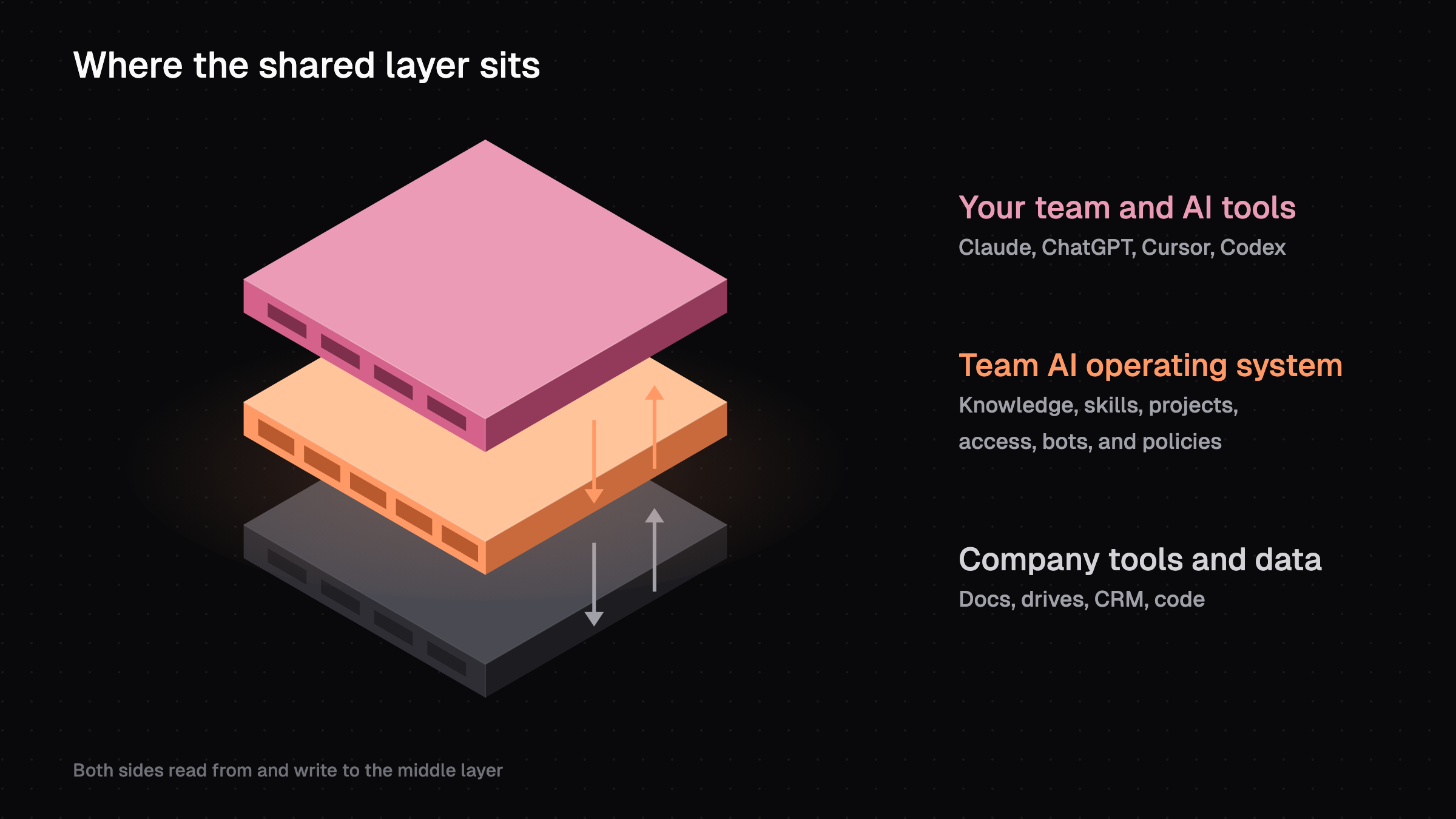
Think of it as a stack. Your people and their AI tools sit on top, your company's tools and data sit at the bottom, and the shared layer sits in the middle. Next, what actually goes into that middle layer?
What goes in a team AI operating system?
Six parts show up in every useful version, whatever tool you build it with. The parts only work as a system once they're connected.
- Shared knowledge. Approved facts about your company: what you sell, who your customers are, your voice, and past decisions. It's written once, kept current, and read at the start of each AI session.
- Skills. Written instructions for work the team does often, like a client recap or sales call prep. One person writes it, and everyone can run it the same way (see how to share AI skills with your team).
- Projects. A home for multi-step work between sessions: the goal, the plan, and what's next. Anyone, or any bot, can pick up where the last person stopped.
- Access and credentials. Rules for who sees which knowledge and accounts. Keys are stored and injected safely instead of pasted into chats, and each client's or company's data stays in its own space.
- Bots or agents. AI workers that run jobs like a morning brief or a weekly report. They follow the same knowledge and access rules as people.
- Policies. Standing rules for how AI behaves: what it must never do and what needs a human's approval. They apply to every session.
When does a folder of prompts become an operating system?
A folder of prompts is a start. It becomes an operating system when a skill can read the knowledge, a bot can run the skill, and the access rules cover all of it.
If what your team learns in AI sessions doesn't get saved anywhere shared, each person has to work it out again.
That raises a fair question: how is this different from the AI tools you already pay for?
How is a team AI OS different from a chat subscription or an agent builder?
A chat subscription gives each person an assistant, and an agent builder automates one workflow. A team AI operating system gives people and agents shared context to run on. Most teams end up with more than one of these.
Chat app subscription (ChatGPT Team, Claude Team)
Main job
A private AI assistant for each person
Who uses it
Individuals, one chat at a time
Company knowledge
Whatever each person uploads or explains
Works across AI tools
Only its own app
What gets saved
Chat history
Agent builder
Main job
Build and run automated workflows
Who uses it
Usually one builder per workflow
Company knowledge
Whatever each workflow is wired to
Works across AI tools
Only its own platform
What gets saved
Run logs
Team AI operating system
Main job
Shared context and tools for the whole team
Who uses it
Everyone on the team, plus bots
Company knowledge
One shared, current source every session reads
Works across AI tools
Sits under several tools at once
What gets saved
Knowledge, decisions, and project state the next person can reuse
You don't have to replace anything. Your team can keep its chat subscriptions and add a shared layer underneath. So how do you know you need one?
What are the signs your team needs one?
Three or more of these signs means the missing piece is shared context.
- People paste the same company background into new chats several times a week.
- Two teammates ask AI the same question and get different answers.
- When someone leaves, their AI setup leaves with them.
- API keys and client logins get shared in Slack or pasted into chats.
- Leadership asks what AI has done for the business, and the answer is "people say it helps."
Quick check: ask two teammates to have their AI tool describe your top customer in three sentences. Compare the answers. If they don't match, your team's AI is working from different context.
If that check failed, the fix is smaller than it sounds. Here's how to start.
How do you start a team AI operating system in a week?
Start small and make it useful on day one. One team and one recurring job is enough for week one.
Day
1
What to do
Pick one team and one recurring job (client recaps, sales prep, weekly reporting)
Done whenEveryone agrees on the first job
Day
2
What to do
Write five knowledge pages: company overview, products, customers, voice, current priorities
Done whenThe pages are in one shared place and current
Day
3
What to do
Turn the recurring job into a written skill that reads those pages
Done whenTwo people run it and get similar results
Day
4
What to do
Move shared credentials out of chats into a secret store, and decide who sees what
Done whenNo keys left in Slack or chat history
Day
5
What to do
Write three to five policies and review the week
Done whenPolicies load in every session, and you have a list of next skills
How do you know it worked?
Two different teammates ask the same question and get the same sourced answer. If that works, add the next skill, the next team, and then a bot that runs a job on a schedule.
How do you keep it current?
Keep one habit: when someone figures something out in an AI session, it goes back into the shared knowledge or a skill. Without it, the knowledge pages go stale within a few months. Here's how we handle that in our own product.
How does this work in HQ?
HQ is one example of a team AI operating system, and it's the one we build. It's an open-source shared layer that sits under Claude Code, Cursor, and Codex.
Company knowledge, decisions, skills, workers (specialized agents), and policies live in HQ and sync across the team. The AI tools read them at the start of each session.
Each company gets its own isolated space with its own knowledge and credentials. Secrets are injected into commands instead of pasted into chats.
For the step-by-step version of the five-day plan, see how to build a shared company brain. For rolling it out past the first team, see company-wide AI adoption.
FAQ
Is a team AI operating system the same as a company wiki?
No. A wiki is written for people to read and goes stale easily. A team AI operating system feeds knowledge into every AI session, adds skills, projects, access rules, and bots, and gets updated as part of the work.
Do we have to stop using ChatGPT or Claude?
No. It sits underneath the tools your team already uses. People keep their preferred apps, and the shared layer gives those apps the same knowledge and rules.
How big does a team need to be?
It pays off once more than a handful of people use AI on the same customers or projects. At around 10 people, re-explaining context already costs real time, and by 50 it's hard to manage without a shared layer.
How long does it take to set one up?
A first version takes about a week: five knowledge pages, one shared skill, credentials out of chat, and a few policies. After that, it grows one skill and one team at a time.
Sources (3)
Last updated October 23, 2026. Facts checked October 23, 2026.